> For the complete documentation index, see [llms.txt](https://ai-security-docs.akto.io/llms.txt). Markdown versions of documentation pages are available by appending `.md` to page URLs; this page is available as [Markdown](https://ai-security-docs.akto.io/akto-atlas-agentic-ai-security-for-employee-endpoints/ai-agent-activity/agentic-components.md).
# Agentic Components
## Overview
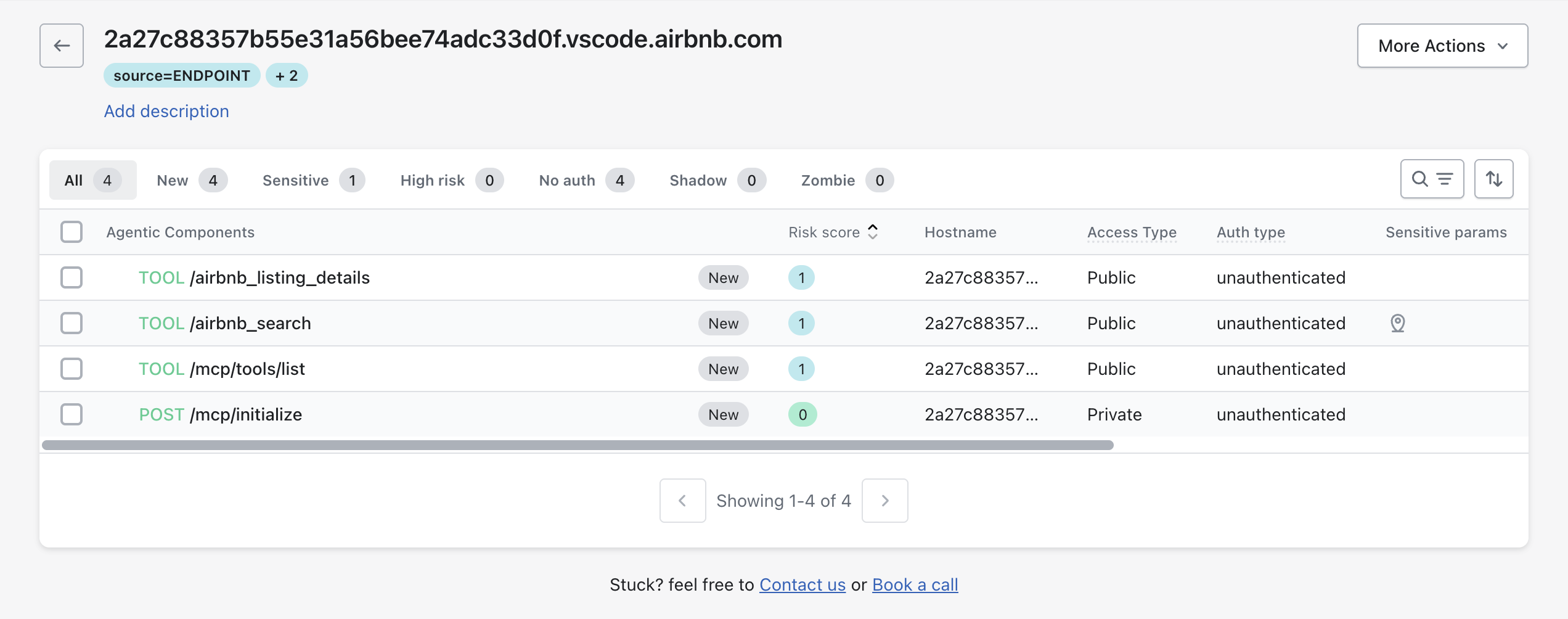
The **Agentic Components** page provides visibility into individual agentic operations exposed by an endpoint.\
Each component represents a discrete agentic capability, such as a tool invocation or MCP method allowing you to review exposure, authentication posture, and observed behavior at the component level.
## What an Agentic Component Present
An **agentic component** represents a single callable operation exposed by an agentic system.\
Examples include:
* Tool calls
* MCP methods
* Initialisation or listing operations
Each component is discovered from observed runtime traffic.
### Agentic Components List
The Agentic Components list displays all components discovered for a selected endpoint.
{% hint style="info" %}
**Component Filters**
You can filter components using predefined categories.
* All: Displays all discovered components
* New: Components recently discovered
* Sensitive: Components handling sensitive parameters
* High risk: Components with elevated risk scores
* No auth: Components exposed without authentication
* Shadow: Components not mapped to known specifications
* Zombie: Inactive components with no recent traffic
{% endhint %}
### Agentic Components Table
| Column | Description |
| ----------------- | ------------------------------------------ |
| Agentic component | Method and path of the operation |
| Risk score | Component-level risk assessment |
| Hostname | Host where the component was observed |
| Access type | Public or private accessibility |
| Auth type | Authentication status |
| Sensitive params | Indicates sensitive parameters in requests |
Selecting a component opens the **Agentic Component Details** panel.
## Agentic Component Details
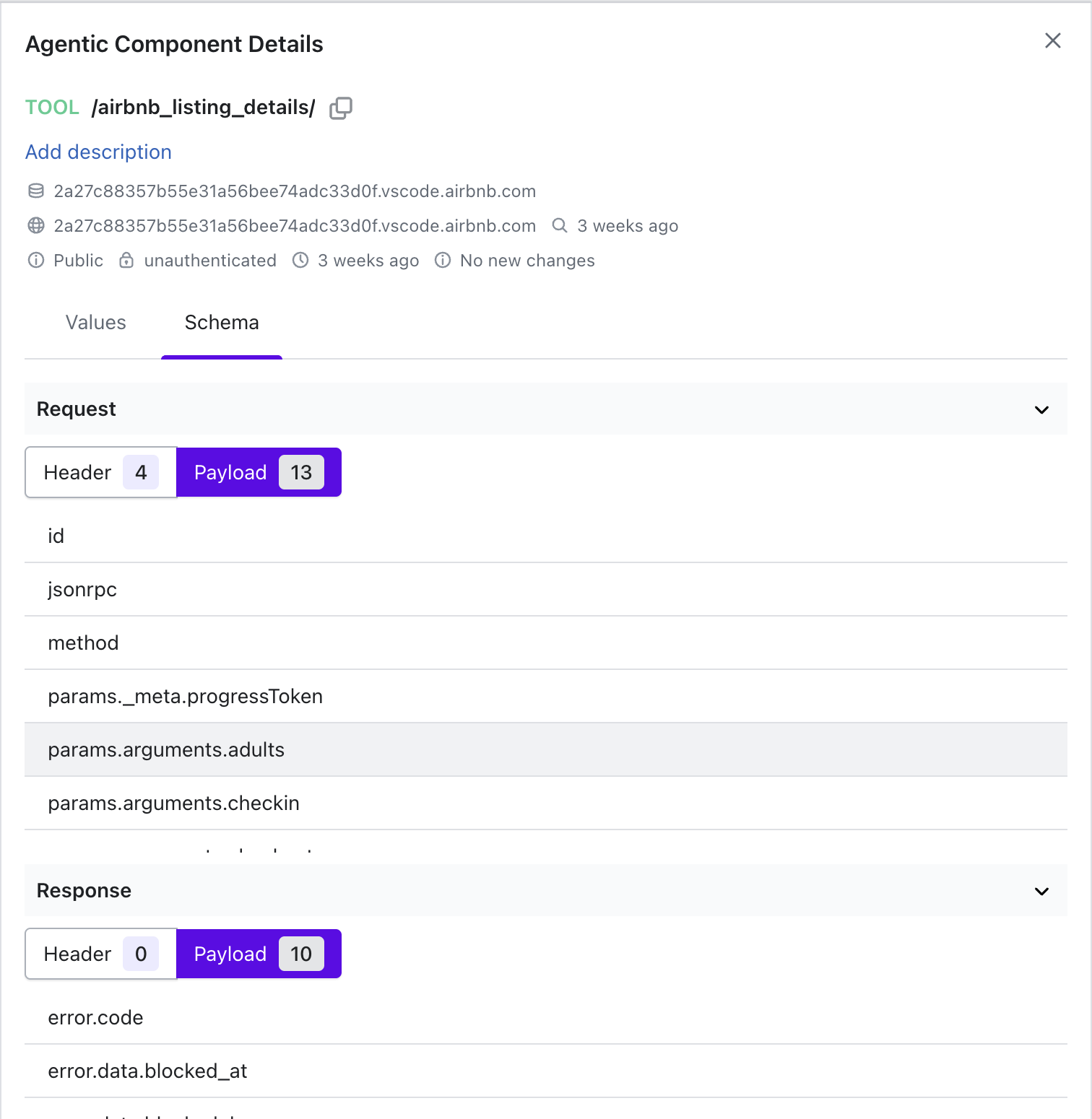
The Agentic Component Details panel opens alongside the components list and provides an in-depth view of the selected component.
### Component Metadata
The metadata section summarises discovery and exposure information.
| Field | Description |
| -------------- | ---------------------------------------------------- |
| Component name | Tool or method identifier |
| Endpoint | Endpoint where the component was observed |
| Access type | Public or private |
| Auth type | Authentication status |
| First seen | Initial discovery timestamp |
| Last seen | Most recent observed activity |
| Change status | Indicates whether the component behavior has changed |
### Values Tab
The **Values** tab shows observed runtime samples for the component.
#### Sample Values
* Request: Observed request method, headers, and payload
* Arguments: Input arguments passed to the component
* Transport: Protocol used for invocation
* Response: Observed response status and payload
Sample values reflect real traffic and help validate how the component is invoked in practice.
### Schema Tab
The **Schema** tab shows the inferred structure of requests and responses for the selected agentic component.\
The schema is generated from observed runtime traffic and represents the actual fields used during execution.
{% tabs %}
{% tab title="Request Schema" %}
The **Request** section lists all observed request fields.\
Fields are grouped by location and displayed using dot-notation to represent nested structures.
You can switch between **Header** and **Payload** to view fields from each part of the request.
**Example request fields**
* `id`
* `jsonrpc`
* `method`
* `params._meta.progressToken`
* `params.arguments.adults`
* `params.arguments.checkin`
{% endtab %}
{% tab title="Response Schema" %}
The **Response** section lists fields observed in responses returned by the component.
You can switch between **Header** and **Payload** to view response-specific fields.
**Example response fields**
* `error.code`
* `error.message`
* `id`
{% endtab %}
{% endtabs %}
{% hint style="info" %}
**Schema Behaviour Notes**
* The schema reflects only fields observed in live traffic.
* Fields appear when they are first detected.
{% endhint %}
## What Next
The **Agentic Components** view is the deepest level of agentic inspection in Akto ATLAS.\
After reviewing component behaviour, you can return to:
* [**Agentic Assets**](/akto-atlas-agentic-ai-security-for-employee-endpoints/ai-agent-activity/agentic-assets.md) to review other agentic systems
* [**Sensitive Data**](/akto-argus-agentic-ai-security-for-homegrown-ai/agentic-ai-discovery/concepts/sensitive-data.md) and [**Audit Data**](/akto-argus-agentic-ai-security-for-homegrown-ai/agentic-ai-discovery/concepts/audit-data.md) views to correlate findings