> For the complete documentation index, see [llms.txt](https://ai-security-docs.akto.io/llms.txt). Markdown versions of documentation pages are available by appending `.md` to page URLs; this page is available as [Markdown](https://ai-security-docs.akto.io/akto-argus-agentic-ai-security-for-homegrown-ai/agentic-security-posture/analysis.md).
# Analysis
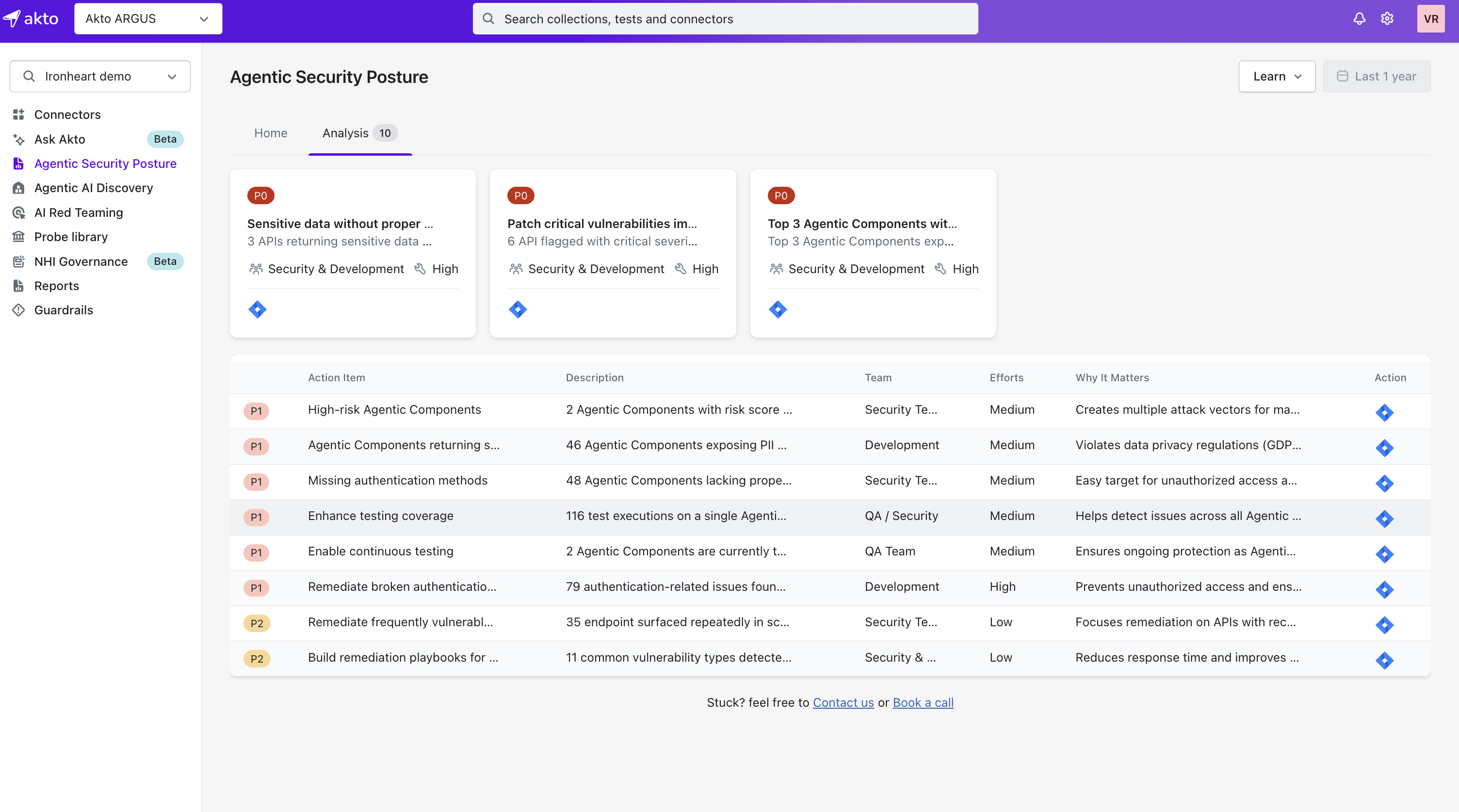
The **Analysis** tab converts raw scan data from your agent components, MCP endpoints, and LLM integrations into a prioritized list of security issues, organized into action items ranked **P0, P1, P2**, so your team can focus on the most critical vulnerabilities first instead of triaging hundreds of individual alerts.
The tab leads with a row of cards for your top priority action items, each showing its priority, a short description, the responsible team, and estimated effort, followed by the full, sortable table of every remaining action item.
### Key Concepts
1. **Action Items**
* Each issue is grouped into an **action item** (e.g., "Agentic Components returning sensitive data" or "Missing authentication methods").
* Action items are team-focused, so whichever team owns the fix, Development, Security, or QA, knows exactly what to address.
2. **Priority Levels (P0, P1, P2)**
* **P0**: Immediate attention required, critical vulnerabilities posing high business risk.
* **P1**: High-severity issues with significant impact on agent security.
* **P2**: Medium or low severity issues, often handled in bulk remediation.
3. **Details per Action Item**
* **Description**: explains the issue and how many components are impacted.
* **Team**: which team should handle remediation, such as Development, Security, or QA.
* **Efforts**: estimated effort (Low/Medium/High) to fix.
* **Why It Matters**: the risk of leaving it unaddressed (e.g., "Violates data privacy regulations").
***
## Drilling Into an Action Item
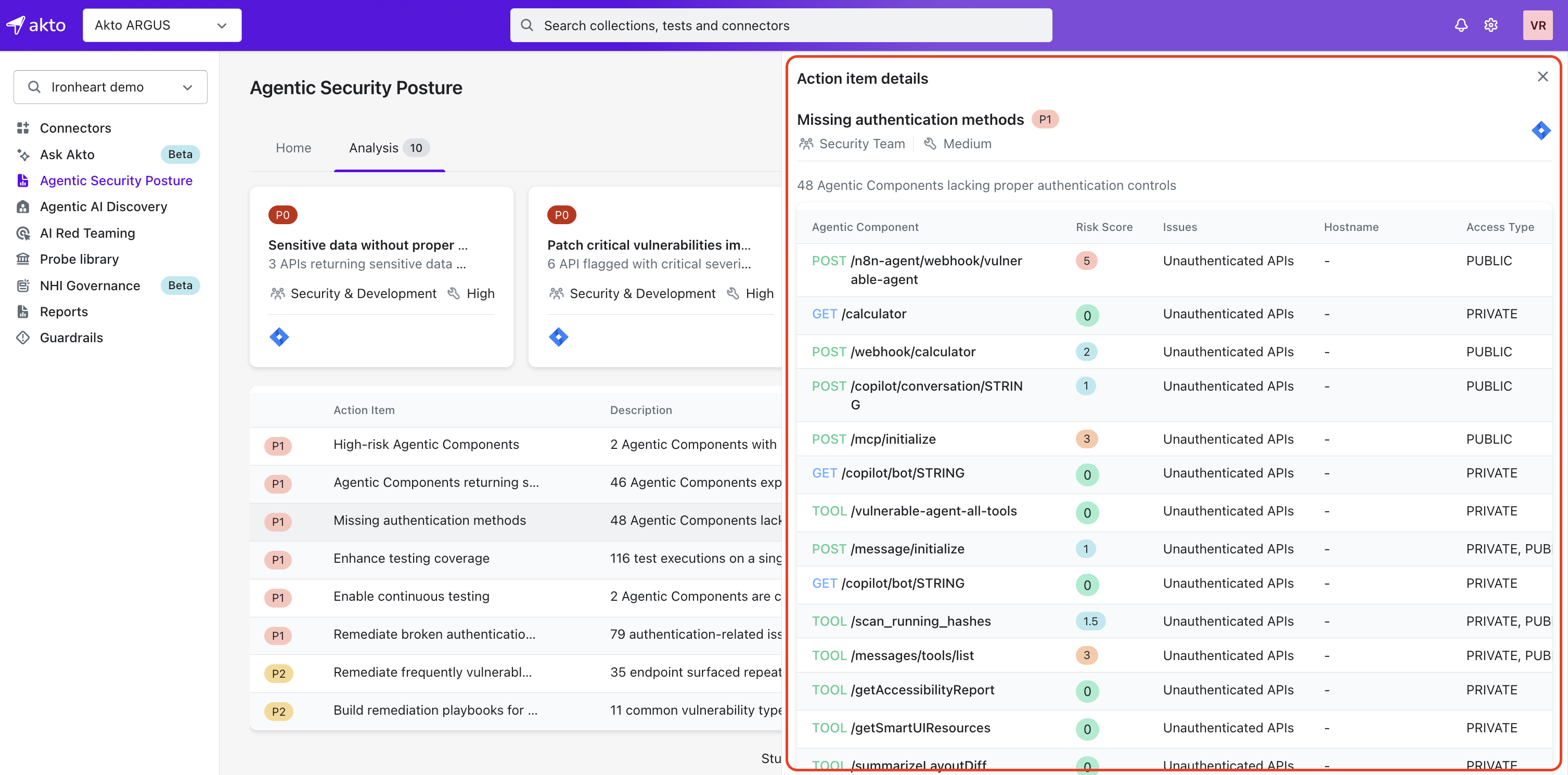
An action item's description and count only tell you that something is wrong, not where. Click into one, and Akto lists every individual agent component or MCP endpoint contributing to it, so you know exactly what to fix instead of investigating the whole inventory to find it.
Each affected component is listed with:
| Column | What it tells you |
| ----------------- | ----------------------------------------------------------------------- |
| Agentic Component | The method and path of the component (e.g. `POST /v1/chat/completions`) |
| Sensitive Params | The sensitivity classification of its parameters (e.g. Info) |
| Risk Score | The component's individual risk score |
| Issues | The type of issue found (e.g. Sensitive Data) |
| Hostname | The host the component was observed on |
| Access Type | Whether it's Public, Private, or both |
| Auth Type | The authentication mechanism detected (e.g. Authorization Header) |
| Last Seen | When traffic was last observed for this component |
| Discovered At | When Akto first discovered this component |
| Last Tested | When this component was last probed |
| Collection | The collection the component belongs to |
From here, you can jump straight into remediating the specific component instead of the action item as a whole.