> For the complete documentation index, see [llms.txt](https://ai-security-docs.akto.io/llms.txt). Markdown versions of documentation pages are available by appending `.md` to page URLs; this page is available as [Markdown](https://ai-security-docs.akto.io/akto-atlas-agentic-ai-security-for-employee-endpoints/nhi-governance/identities.md).

# Identities

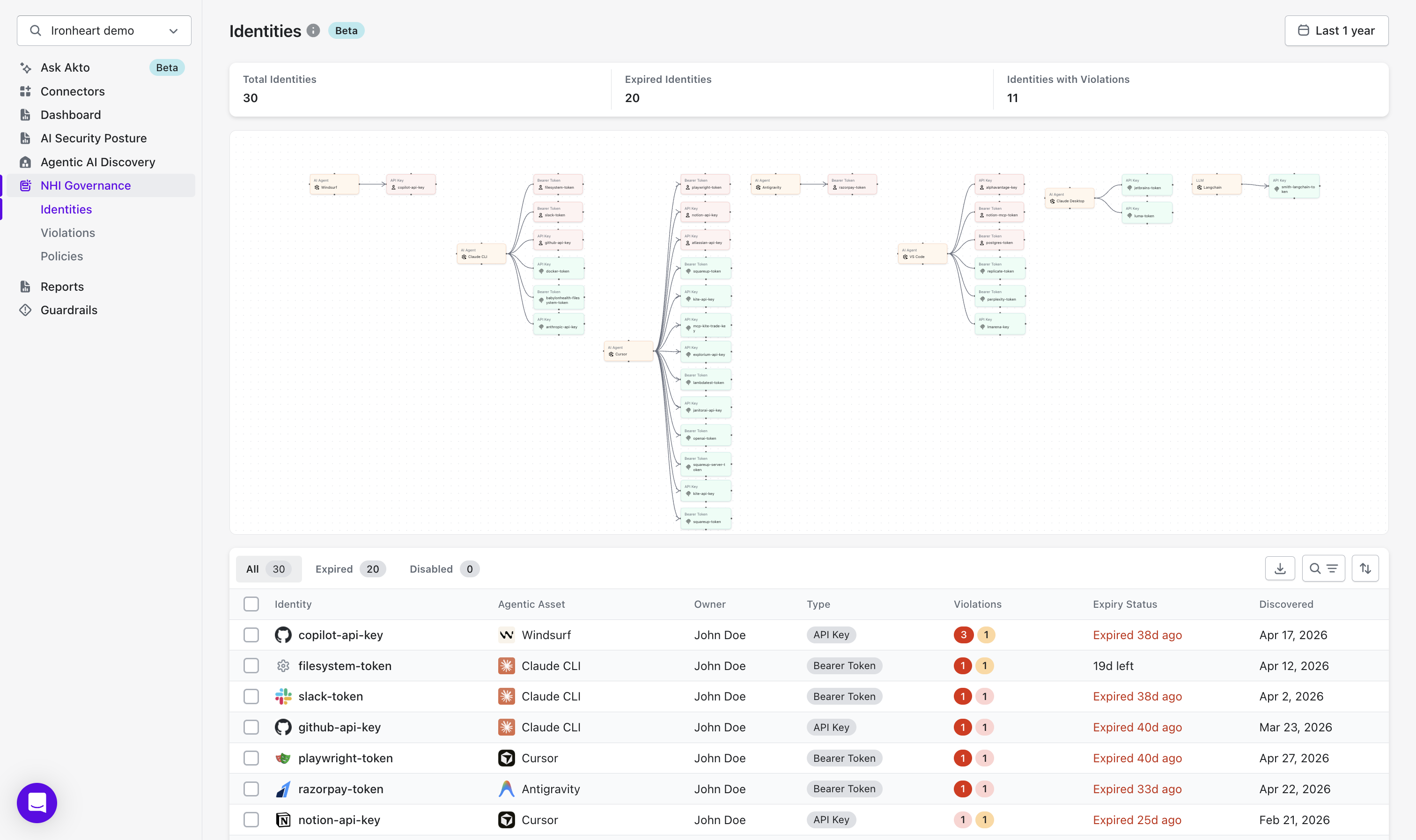
The **Identities** view is the central inventory of all Non-Human Identities discovered across your employees' agentic tools. It shows every API key, bearer token, and service credential that Atlas has observed in endpoint traffic, along with who owns it, which agentic asset uses it, its current expiry state, and any policy violations attached to it.

<div data-with-frame="true"><figure><img src="/files/UW7C7UXyFf2Ix8kYbUwa" alt="" width="563"><figcaption></figcaption></figure></div>

## Summary Cards

At the top of the page, three cards give you an at-a-glance health check of your NHI estate.

<table><thead><tr><th width="211.28125">Card</th><th>What It Shows</th></tr></thead><tbody><tr><td>Total Identities</td><td>The total count of distinct NHIs discovered across all endpoints and agentic assets</td></tr><tr><td>Expired Identities</td><td>The number of NHIs whose credentials have passed their expiry date</td></tr><tr><td>Identities with Violations</td><td>The number of NHIs that have at least one active policy violation</td></tr></tbody></table>

## Identity Graph

Below the summary cards, Akto renders a relationship graph that maps NHIs to the agentic assets that use them. Each node represents either an identity or an agentic asset, and edges show which assets hold which credentials.

Use the graph to:

* Quickly spot identities connected to multiple agentic assets these carry wider blast radius if compromised.
* Identify isolated credentials with no active asset connections, which may indicate orphaned or forgotten keys.
* Navigate to an identity or asset directly by selecting its node.

## Identities Table

The table lists every discovered NHI with the columns below.

<table><thead><tr><th width="266.03125">Column</th><th>Description</th></tr></thead><tbody><tr><td>Identity</td><td>The name or identifier of the credential (e.g. <code>copilot-api-key</code>, <code>slack-token</code>)</td></tr><tr><td>Agentic Asset</td><td>The AI tool or MCP server that holds this credential (e.g. Claude CLI, Cursor, Windsurf)</td></tr><tr><td>Owner</td><td>The employee whose endpoint the credential was discovered on</td></tr><tr><td>Type</td><td>The credential type <code>API Key</code> or <code>Bearer Token</code></td></tr><tr><td>Violations</td><td>Count of active policy violations; the red badge shows critical violations, orange shows warnings</td></tr><tr><td>Expiry Status</td><td>Whether the credential is active, has a countdown to expiry, or has already expired</td></tr><tr><td>Discovered</td><td>The date Akto first observed this credential in endpoint traffic</td></tr></tbody></table>

<details>

<summary>Expiry Status Values</summary>

<table><thead><tr><th width="222.3671875">Status</th><th>Meaning</th></tr></thead><tbody><tr><td>Active</td><td>The credential is valid and within its allowed window</td></tr><tr><td><code>Xd left</code></td><td>The credential expires in X days</td></tr><tr><td><code>Expired Xd ago</code></td><td>The credential expired X days ago but may still be in use</td></tr><tr><td>No expiry</td><td>The credential has no expiry date configured</td></tr><tr><td>Disabled</td><td>The credential has been manually disabled</td></tr></tbody></table>

</details>

## Filters

Use the filter tabs at the top of the table to narrow the view:

* **All** shows every discovered identity regardless of status.
* **Expired** shows only identities whose expiry date has passed.
* **Disabled** shows identities that have been manually disabled.

## Identity Details

Clicking any row in the table opens the **Identity Details** panel. The panel header shows the credential name, its violation badge counts, and key metadata credential type, access level, and when it was last used.

### Actions

The **Action** button in the top-right corner of the panel lets you act on the identity without leaving the detail view.

**Disable Identity**

* Selecting **Disable** marks the identity as disabled in Akto.

  <div data-with-frame="true"><figure><img src="/files/psRjrk3WtO0O17KnOdyK" alt="" width="563"><figcaption></figcaption></figure></div>

A disabled identity is excluded from active monitoring and will no longer generate new violations. Use this when a credential has been revoked or decommissioned and you want to suppress further alerts without deleting the discovery record.

The panel has two tabs.

{% tabs %}
{% tab title="Overview" %}
The **Overview** tab shows a graph and an auto-generated description for the selected identity.

<div data-with-frame="true"><figure><img src="/files/Azy0hMpZvixzkeGaGQwm" alt="" width="563"><figcaption></figcaption></figure></div>

### Graph

The graph visualises the full access chain for the credential:

* **Owner** the employee whose endpoint the credential was discovered on.
* **AI Agent** the agentic tool that holds the credential (e.g. Windsurf, Claude CLI, Cursor).
* **Credential node** the identity itself, labelled with its name and type.
* **Downstream services** the external services the credential can reach, with the permission level on each edge (e.g. `READ_WRITE` to GitHub, `READ` to Slack, `ADMIN` to AWS S3).

Use the graph to understand the blast radius of a compromised credential every service reachable via that key is visible at a glance.

### Description

Below the graph, Akto generates a plain-language summary of the identity's current state: which agentic asset uses it, the access level it grants, and how many active violations it has.
{% endtab %}

{% tab title="Violations" %}
The **Violations** tab lists every active policy breach attached to this identity. The tab label shows the total violation count (e.g. `Violations 4`).

<div data-with-frame="true"><figure><img src="/files/Bzu40jvMFkx8uvWY93Oe" alt="" width="563"><figcaption></figcaption></figure></div>

<table><thead><tr><th width="173.82421875">Column</th><th>Description</th></tr></thead><tbody><tr><td>Violation</td><td>A plain-language description of the specific breach (e.g. "Agent credential accessing production S3 with admin privileges")</td></tr><tr><td>Identity</td><td>The credential the violation is attached to</td></tr><tr><td>Agentic Asset</td><td>The agentic tool associated with the identity at the time of the breach</td></tr><tr><td>Severity</td><td>The risk level <code>Critical</code>, <code>High</code>, <code>Medium</code>, or <code>Low</code></td></tr><tr><td>Policy</td><td>The policy rule that was breached (e.g. "Restrict Access to Sensitive Resources", "Rotate API Keys Every 30 Days")</td></tr><tr><td>Discovered</td><td>When Akto first detected this violation</td></tr></tbody></table>

Violations are paginated. Use the arrow controls at the bottom of the table to page through all entries.

For full details on violation types and remediation steps, see [Violations](/akto-atlas-agentic-ai-security-for-employee-endpoints/nhi-governance/violations.md).
{% endtab %}
{% endtabs %}

## What You Can Do

* Export the full identity list to CSV using the download icon at the top right of the table.
