> For the complete documentation index, see [llms.txt](https://ai-security-docs.akto.io/llms.txt). Markdown versions of documentation pages are available by appending `.md` to page URLs; this page is available as [Markdown](https://ai-security-docs.akto.io/akto-atlas-agentic-ai-security-for-employee-endpoints/endpoints-discovery-agents/openclaw-clawdbot-visibility.md).
# OpenClaw (Clawdbot) Visibility
## Overview
Akto Atlas provides visibility into **employee usage of OpenClaw (Clawdbot)** by observing agent activity at the endpoint level.\
Visibility is enabled through the **AI Endpoint Shield**, which operates locally on enterprise-managed devices.
{% hint style="success" %}
Akto Atlas does not require direct integration with Clawdbot services, APIs, or SaaS infrastructure.
{% endhint %}
## Observation Model
Akto Atlas observes OpenClaw interactions through request and response guardrail validation.
Requests originating from OpenClaw channels such as AI models, chat applications, productivity tools, and automation platforms first pass through **Akto Endpoint Shield** for input guardrail validation before reaching **OpenClaw (Clawdbot)**.
Responses generated by OpenClaw pass through **Akto Endpoint Shield** again for response guardrail validation. Metadata from both validation stages is sent to the **Akto Dashboard** for monitoring and visibility.
## Attributes Detected by Akto Atlas
After Clawdbot successfully connects to AI Endpoint Shield, Akto Atlas can identify:
* Presence of Clawdbot on enterprise-managed endpoints
* Endpoints where Clawdbot is actively used
* Enterprise users associated with each endpoint
* First observed connection timestamp
* Most recent observed connection timestamp
* Frequency of observed usage sessions
## Visibility Mechanisms
Akto Atlas provides visibility into OpenClaw activity through gateway-based request monitoring and event-based hook integrations.
### Through AI Agent Gateway
Akto Atlas can observe OpenClaw model requests when OpenClaw routes LLM traffic through the **Akto AI Agent Gateway**.
The AI Agent Gateway operates as a middleware layer between OpenClaw and the configured model provider. OpenClaw sends model requests to the gateway endpoint instead of directly calling the LLM provider.
The request flow becomes:
```mermaid
flowchart LR
User[User]
Channel[Slack / Telegram]
OpenClaw[OpenClaw]
Gateway[Akto AI Agent Gateway]
Model[Model Provider]
User --> Channel
Channel --> OpenClaw
OpenClaw --> Gateway
Gateway --> Model
Model --> Gateway
Gateway --> OpenClaw
OpenClaw --> Channel
Channel --> User
```
The gateway records request metadata, applies guardrails, and forwards the request to the configured model provider. **Akto Atlas** receives the recorded metadata and associates the activity with the OpenClaw agent and the enterprise user.
Enterprise teams must configure OpenClaw to route model traffic through the gateway endpoint. Following are the configuration steps:
{% stepper %}
{% step %}
**Set Up the AI Agent Gateway**
Deploy the Akto AI Agent Gateway in the environment where OpenClaw sends model requests. The gateway acts as the intermediary between OpenClaw and the actual model provider.
Deployment instructions and architecture details are available in the following documentation: [AI Agent Gateway](/agentic-guardrails/overview/akto-agent-proxy.md)
After completing the gateway deployment, note the gateway endpoint URL. OpenClaw uses the gateway endpoint as the model provider base URL.
{% endstep %}
{% step %}
**Update the `openclaw.json` Configuration File**
OpenClaw uses the `openclaw.json` configuration file to define model providers. Add a provider entry that routes model requests to the Akto AI Agent Gateway.
Example configuration:
```json
"models": {
"providers": {
"secure-local": {
"api": "openai-completions",
"apiKey": "${OPENAI_API_KEY}; X-Original-Provider: openai/gpt-4o-mini",
"baseUrl": "/v1",
"models": [
{
"id": "gpt-4o-mini",
"name": "gpt-4o-mini"
}
]
}
}
}
```
* The `baseUrl` parameter must reference the AI Agent Gateway endpoint instead of the direct model provider endpoint. `AKTO_AI_AGENT_PROXY_URL` follows the format `https://-guardrails.akto.io`; contact the Akto support team to get the URL for your account.
* The `X-Original-Provider` header allows the gateway to forward the request to the correct model provider after applying guardrails.
{% endstep %}
{% step %}
**Register the Provider in the Authentication Profile**
OpenClaw requires an authentication profile entry for every configured provider. The authentication profile allows OpenClaw to activate the configured model provider.
Create or update the file `auth.profile.json` with the following configuration:
```json
{
"version": 1,
"profiles": {
"secure-local:dummy": {
"provider": "secure-local",
"type": "token"
}
},
"lastGood": {
"secure-local": "secure-local:dummy"
}
}
```
The authentication profile registers the gateway-backed provider so OpenClaw can route model requests through the AI Agent Gateway.
{% endstep %}
{% endstepper %}
After completing the configuration steps, OpenClaw sends model requests through the gateway. Akto Atlas observes the requests and records model interaction metadata.
### Through Hooks
Akto Atlas can observe OpenClaw interaction events through message lifecycle hooks when the OpenClaw platform exposes **message send and message receive hooks**.
Hook-based visibility depends on OpenClaw providing those hooks. Akto Atlas can subscribe to hook endpoints only after OpenClaw exposes the hook interface.
When OpenClaw triggers the message send or message receive hook, interaction metadata can be sent to Akto Atlas to record OpenClaw activity associated with enterprise users.
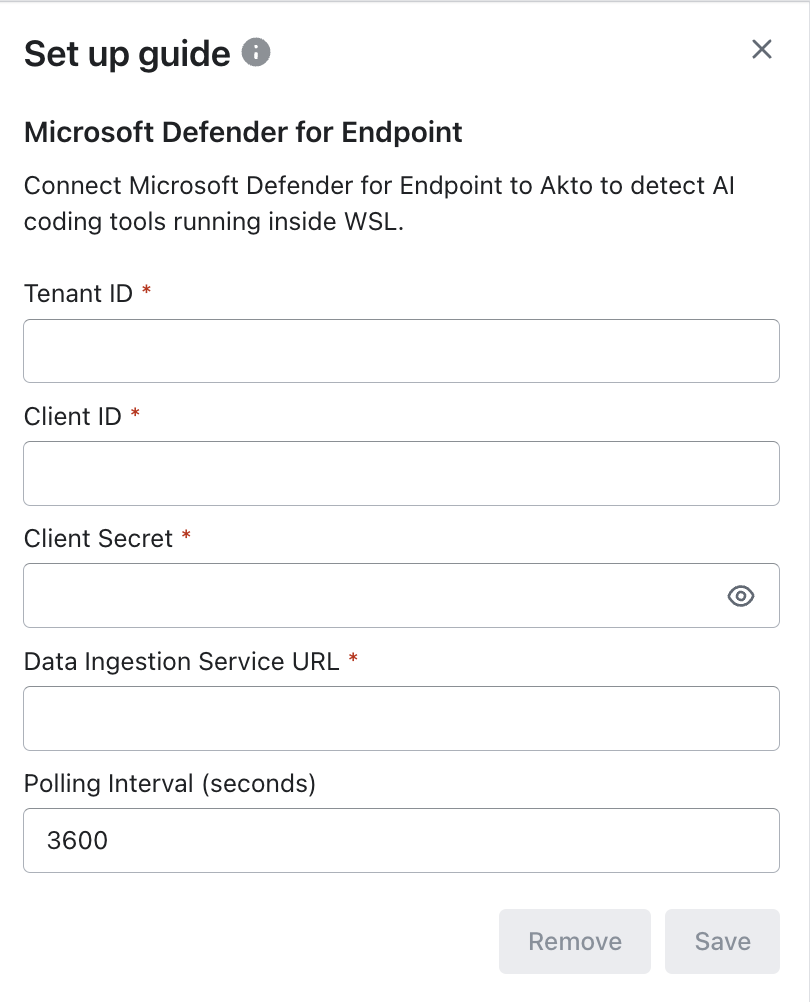
### Through MS Defender for Endpoint
In addition to **Gateway-based** and **Hook-based** visibility, OpenClaw also supports discovery via **Microsoft Defender for Endpoint**.
This method enables endpoint-level visibility by integrating Defender with Akto Atlas.
#### Steps
{% stepper %}
{% step %}
Navigate to **Akto Atlas** dashboard and go to **Connectors.**
{% endstep %}
{% step %}
Select Microsoft Defender for Endpoint
{% endstep %}
{% step %}
Fill in the required fields:
* Tenant ID → Your Azure AD tenant ID
* Client ID → App registration client ID
* Client Secret → App secret for authentication
* Data Ingestion Service URL → Defender API ingestion endpoint
* Polling Interval → Frequency (in seconds) to fetch data
{% endstep %}
{% step %}
Click Save.
{% endstep %}
{% endstepper %}
#### How it Works
* Akto connects to Defender using the configured credentials
* Defender provides endpoint-level telemetry
* This enables:
* Detection of AI tools
* Visibility into OpenClaw activity
* Integration with guardrail enforcement workflows
## Enable Guardrail via MS Defender for Endpoint
To enable OpenClaw guardrails on endpoints using Microsoft Defender:
{% stepper %}
{% step %}
Follow the steps from:\
[**Deploy via Microsoft Defender** ](/akto-atlas-agentic-ai-security-for-employee-endpoints/endpoints-discovery-agents/deploy-via-microsoft-defender.md#steps-to-deploy)**→ up to Step 3**
{% endstep %}
{% step %}
For OpenClaw:
* Request the appropriate script from the **Akto support team**
* macOS / Linux → `.sh` script
* Windows → `.ps1` script
{% endstep %}
{% step %}
After completing the setup run the script via Live Response:
1. Navigate to:
* **Microsoft Defender → Assets → Devices**
2. Select the target device
3. Click **Initiate live response session**
4. Once connected, run the script:
{% code overflow="wrap" %}
```shell
run update_openclaw_wsl_clean.ps1 -parameters "AKTO_PROXY_URL=https:your-guardrails-url.akto.io OPENAI_API_KEY=sk-xxxxx ORIGINAL_PROVIDER= / MODEL_API=openai-completions MODEL_ID= "
```
{% endcode %}
`AKTO_PROXY_URL` follows the format `https://-guardrails.akto.io`; contact the Akto support team to get the URL for your account.
Wait for the script to complete execution.
{% endstep %}
{% endstepper %}
🐧 WSL (Additional Setup)
If you are using WSL, complete the following before running the script
{% hint style="info" %}
Live Response and updates must be executed on the **Windows host** (not inside WSL)
{% endhint %}
**1. Update Script Variables**
* Open the script in a text editor
* Update required environment variables (API key, model, etc.)
{% hint style="info" %}
The script runs on the Windows host and connects to WSL using this path.
{% endhint %}
**2. Verify or Install `jq`**
Check if installed:
```bash
which jq
jq --version
```
If not installed:
```bash
sudo apt update && sudo apt install jq -y
```
**3. Run The Script**
Run the script from the Live Response session:
```bash
run script.ps1
```
## Observability Location in Akto Atlas
### Assets Inventory
Clawdbot appears in the **Agentic** **Assets** inventory within Akto Atlas.
For each Clawdbot asset, Akto Atlas displays:
* Asset name: Clawdbot
* Detection source: AI Agent
* Associated endpoints
* Risk Score
* First seen timestamp
* Last seen timestamp
## Supported Operating Systems
Akto Atlas supports OpenClaw visibility on enterprise-managed endpoints running:
* macOS
* Windows
* Linux
When AI Endpoint Shield runs on any of these operating systems, Akto Atlas can observe OpenClaw connections to the local MCP endpoint and register usage metadata.
## Data Scope and Enforcement Boundaries
Akto Atlas enforces strict boundaries on observed data:
* Data collection begins only after AI Endpoint Shield installation
* Visibility is limited to endpoints where AI Endpoint Shield is active
* Only usage metadata is collected
* No inspection of prompts, internal logic, or generated outputs
* No modification, blocking, or interference with Clawdbot execution
## Get Support for your Akto setup
There are multiple ways to request support from Akto. We are 24X7 available on the following:
1. In-app `intercom` support. Message us with your query on intercom in Akto dashboard and someone will reply.
2. Join our [discord channel](https://www.akto.io/community) for community support.
3. Contact `support@akto.io` for email support.
%20(1)%20(1)%20(1)%20(1)%20(1)%20(1).png?alt=media)