For the complete documentation index, see llms.txt. This page is also available as Markdown.

Run Live Response & Queries via Akto

Overview

You can use Microsoft Defender Run Queries in Akto Atlas to discover agentic activity and endpoints directly from employee devices.

To access this feature, navigate to:

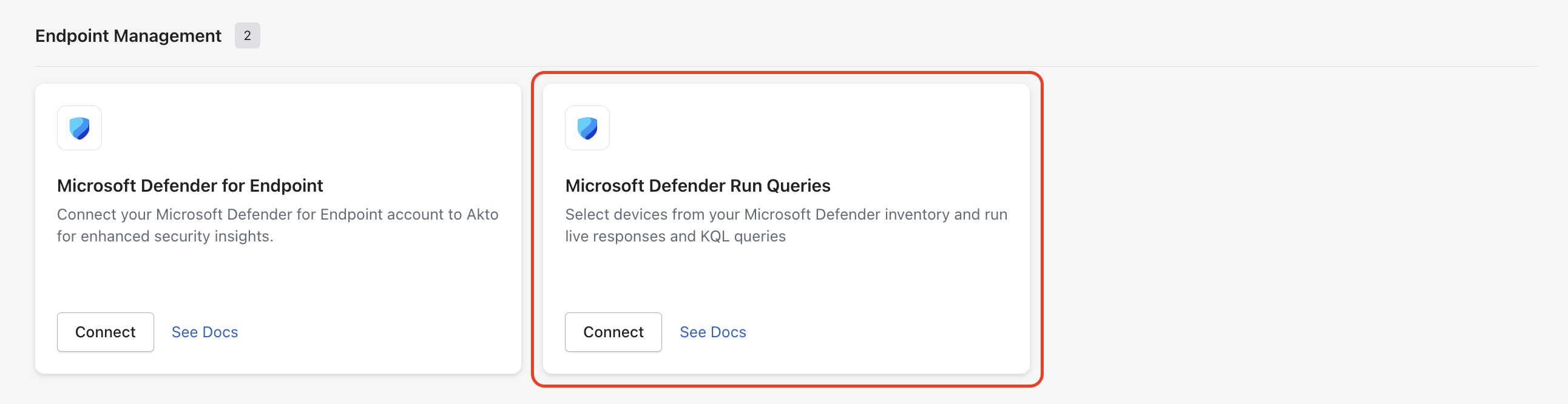
Akto Atlas → Connectors → Microsoft Defender → Run Queries

This integration allows you to:

  • Run scripts on endpoints (Live Response)

  • Query Defender telemetry (KQL / Advanced Hunting)

Both methods help you uncover API usage, shadow endpoints, and external services used across your organisation.

What You Use This For in Akto

This feature has two clear purposes:

Option
Usecase

Remotely install Akto scripts for guardrails on endpoint devices.

Identify AI tools like Cursor, Claude, and similar applications running on endpoints.

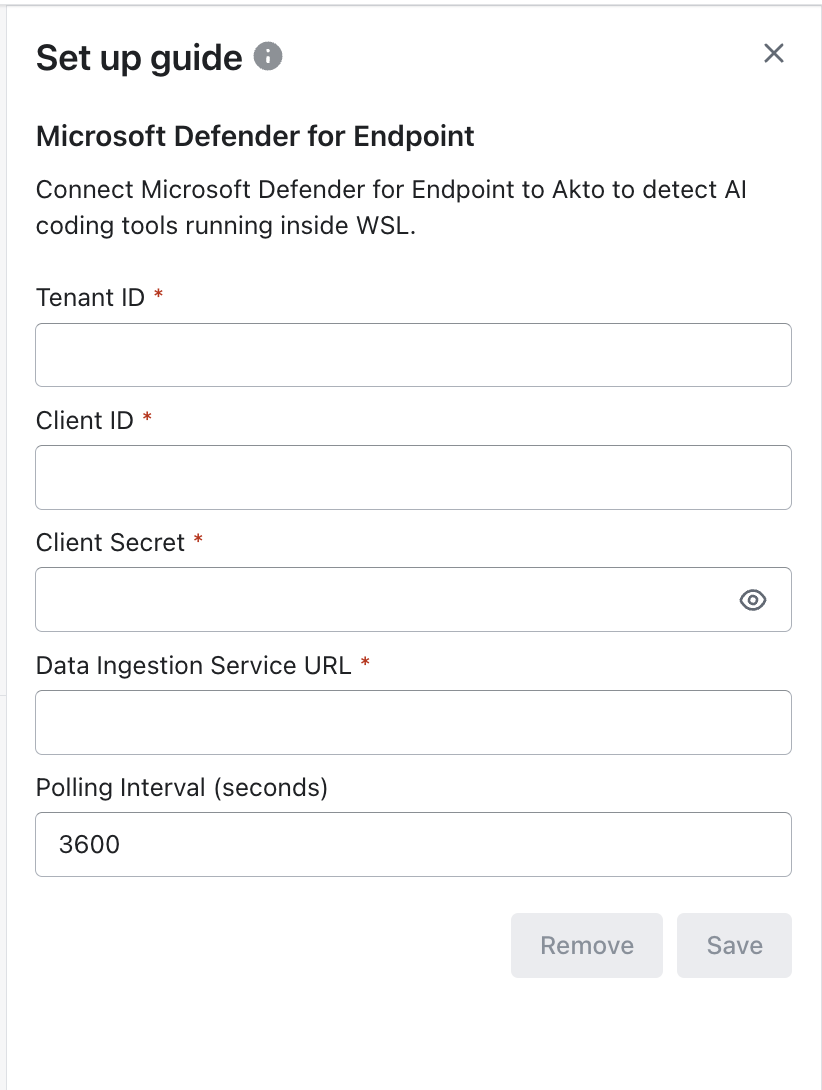
1. Set Up Microsoft Defender Connector

Before running queries or deploying guardrails, you need to connect Microsoft Defender to Akto.

You can find this setup in:

Akto Atlas → Connectors → Microsoft Defender for Endpoint

In the connector setup screen, provide the following:

  • Tenant ID

  • Client ID

  • Client Secret

  • Data Ingestion Service URL

  • Polling Interval (seconds)

Credentials & Permissions (Required)

Akto authenticates to Microsoft Defender via the OAuth 2.0 client credentials flow against a Microsoft Entra app registration. Grant the app the following four Application API permissions (under Microsoft Threat Protection / WindowsDefenderATP) and grant admin consent in the Entra portal.

Permissions Required (minimal set)
Permission
Type
Why Akto needs it

AdvancedQuery.Read.All

Application

Critical — Run KQL Advanced Hunting queries (POST /api/advancedqueries/run) used to discover installed AI software and AI CLI process activity.

Machine.ReadWrite.All

Application

List onboarded devices (GET /api/machines), read Live Response action status (GET /api/machineactions/{id}), and obtain the result download link (GetLiveResponseResultDownloadLink). Microsoft requires Machine.ReadWrite.All (not just Machine.Read.All) for the download-link endpoint.

Machine.LiveResponse

Application

Critical — Initiate Live Response sessions on devices (POST /api/machines/{id}/runliveresponse) to deploy Akto guardrails or run discovery scripts.

Library.Manage

Application

Upload Akto scripts to the Live Response file library (POST /api/libraryfiles) before they can be executed on devices.

Additional Defender configuration (not API permissions)

API permissions alone are not enough for Live Response. Also confirm:

  1. Microsoft Defender for Endpoint Plan 2 license — Live Response is a Plan 2-only capability.

  2. Live Response feature enabled in Settings → Endpoints → Advanced features → Live Response. Enable Live Response for servers and Live Response unsigned script execution if your discovery scripts are unsigned or your targets include servers/Linux/macOS.

  3. Device group automated remediation level must be at least Standard for every group Akto should reach. Groups configured as No remediation will reject Live Response API calls.

  4. Defender RBAC — If your tenant uses Defender role-based access (instead of the default Use basic permissions), the app's service principal must be assigned a custom role with View data + Active remediation actions, scoped to the relevant device groups.

Common 403 errors and what they mean
Error
Cause

Missing application roles. API required roles: Machine.Read.All, Machine.ReadWrite.All

Machine.ReadWrite.All is missing or admin consent wasn't granted.

Missing application roles. API required roles: AdvancedQuery.Read.All

AdvancedQuery.Read.All is missing or admin consent wasn't granted.

Forbidden — needs minimum remediation level

Device group automated remediation is No remediation — raise to Standard or higher.

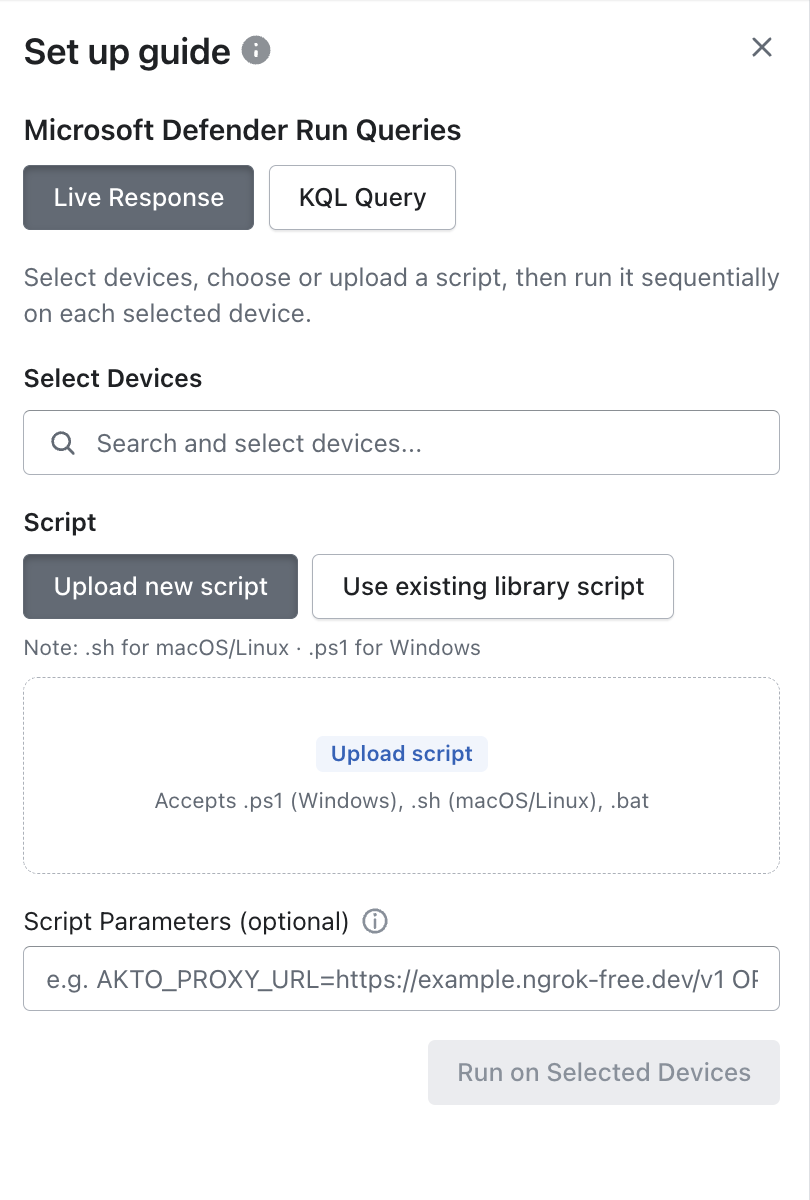
Option 1: Run Live Response Scripts

You run scripts on selected devices to actively collect data.

Use this when you want to:

  • Deploy Akto collectors

  • Extract API traffic or logs

  • Gather system/network metadata from endpoints

Steps to Run

1

Select Live Response

Choose Live Response from the Run Queries screen.

2

Select Devices

Search and select the devices where you want to run your script.

  • You can select multiple devices

  • Scripts will run sequentially on each device

3

Add Your Script

You have two options:

  • Upload new script

  • Use existing library script

Supported formats:

  • .ps1 (Windows)

  • .sh (macOS/Linux)

  • .bat

4

(Optional) Add Script Parameters

You can pass parameters to your script at runtime.

Example:

5

Run the Script

Click Run on Selected Devices to execute the script.

What Happens Next

  • The script runs remotely via Microsoft Defender

  • Guardrails are installed on each selected device

  • Execution happens sequentially per endpoint

Example Use Cases

You use Live Response primarily to:

  • Deploy Akto guardrails across endpoint devices

  • Enforce safe usage policies for agentic AI tools

  • Standardize security controls across your organization

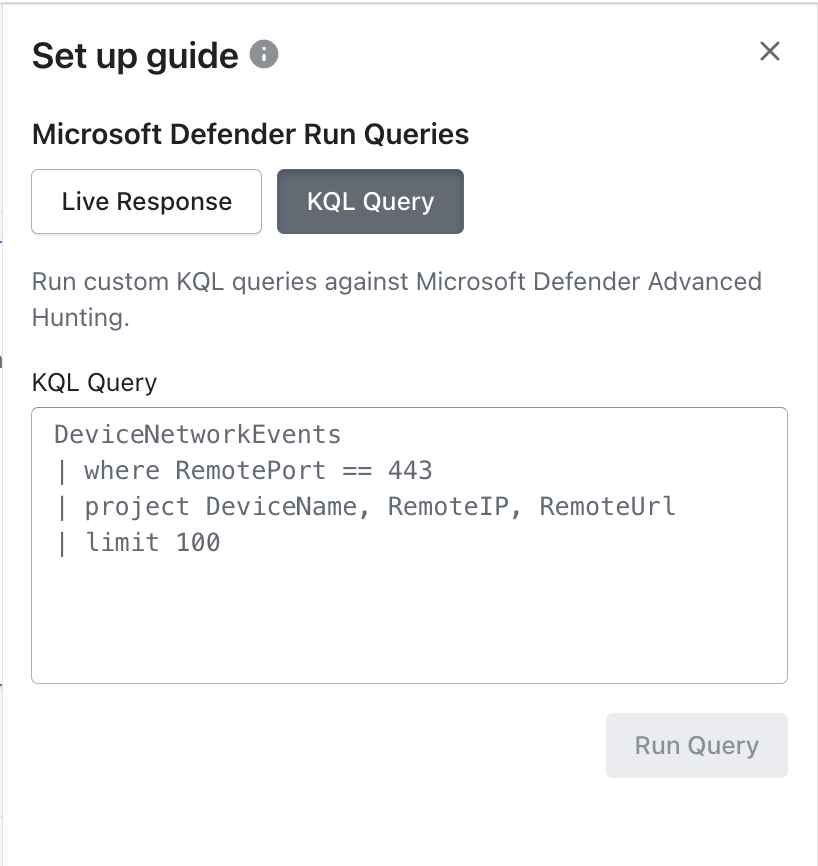
Option 2: Run KQL Queries

You can query existing Microsoft Defender telemetry using Kusto Query Language (KQL).

You use KQL queries to:

  • Detect installations of agentic tools such as:

    • Cursor

    • Claude

    • Other AI-assisted development tools

  • Identify which devices are running these applications

  • Monitor adoption and potential risk exposure

Steps to Run

1

Select KQL Query

Switch to the KQL Query tab.

2

Enter Your Query

Example:

3

Run Query

Click Run Query to execute.

What You Get

You’ll receive structured results showing:

  • Devices with agentic tools installed

  • Software versions

  • Visibility into tool distribution across your organization

Best Practices for You

  • Always filter results to keep queries fast

  • Use limit to control output size

  • Focus on relevant fields like RemoteUrl

  • Start simple, then refine queries

What Next

Now that you’ve configured and used Microsoft Defender Run Queries, you can proceed with:

Last updated