> For the complete documentation index, see [llms.txt](https://ai-security-docs.akto.io/llms.txt). Markdown versions of documentation pages are available by appending `.md` to page URLs; this page is available as [Markdown](https://ai-security-docs.akto.io/akto-atlas-agentic-ai-security-for-employee-endpoints/endpoints-discovery-agents/browser-extensions/chrome.md).
# Chrome
Discover AI agents and MCP servers directly from Google Chrome or any Chromium-based browser (Edge, Brave, Opera, etc.). The Akto Security extension captures agent interactions in real-time as you browse.
## What Extension Captures
The Chrome extension monitors:
* AI agent API calls and responses
* MCP server interactions
* Tool invocations and parameters
* Authentication tokens and headers
* Request/response payloads
All captured data is sent securely to your Akto instance for analysis.
{% hint style="info" %}
**Privacy & Security**
The extension only captures traffic when actively enabled and only sends data to your configured Akto instance. You have full control over what gets monitored.
{% endhint %}
## Enterprise Deployment Using Google Workspace
### Prerequisites
You can gather the following information before starting deployment:
* Google Workspace administrator access to `https://admin.google.com`
* Target Organisational Unit (OU) or user group for deployment
* Chrome extension ID provided by the Akto Support team
* Custom extension URL provided by the Akto Support team
* Update XML URL provided by the Akto Support team
{% hint style="info" %}
**Support Contact**
You can request the extension ID, custom extension URL, and update XML URL from the Akto Support team at [**support@akto.io**](mailto:support@akto.io).
{% endhint %}
### Installation Steps
{% stepper %}
{% step %}
**Navigating to Chrome Extension Management**
1. Sign in to `https://admin.google.com`.
2. Navigate to **Devices**.
3. Select **Chrome**.
4. Select **Apps & extensions**.
5. Open the **Users and browsers** tab.
6. Select the target Organisational Unit.
{% endstep %}
{% step %}
**Adding the Akto Chrome Extension by ID**
1. Select the yellow **+** button.
2. Choose **Add Chrome app or extension by ID**.
3. Enter the Chrome extension ID provided by the Akto Support team.
4. Expand **From a custom URL**.
5. Enter the custom extension URL provided by the Akto Support team.
6. Select **Save**.
{% endstep %}
{% step %}
**Configuring Force Installation**
1. Open the extension configuration panel.
2. Set **Installation policy** to **Force install**.
3. Enter the **update XML URL** provided by the Akto Support team in the **Installation URL** space.
4. Select **Save**.
Now, force installation enables automatic deployment to all managed Chrome users within the selected Organisational Unit.
{% endstep %}
{% endstepper %}
## Enterprise Deployment Using Microsoft Intune (Windows)
You can deploy and force-install the Akto Security Chrome extension to Intune-managed Windows devices using a Settings Catalog profile.
Akto provides two required values:
* Extension ID
* Update XML URL
Follow the full step-by-step guide here:
* [Intune Deployment (Windows)](/akto-atlas-agentic-ai-security-for-employee-endpoints/endpoints-discovery-agents/browser-extensions/chrome/intune-deployment.md)
## Enterprise Deployment Using NinjaOne (Windows)
You can deploy and force-install the Akto Security Chrome extension to NinjaOne-managed Windows devices using a PowerShell automation script and Chrome force-install policy.
Akto provides two required values:
* Extension ID
* Update XML URL
Follow the full step-by-step guide here:
* [NinjaOne Deployment (Windows)](/akto-atlas-agentic-ai-security-for-employee-endpoints/endpoints-discovery-agents/browser-extensions/chrome/ninjaone-deployment.md)
## Deployment using ZIP File
### Prerequisites
* Google Chrome browser (Version 88 or higher)
* The Akto Security extension ZIP file (required).
* The extension folder (extracted from the ZIP file)
{% hint style="warning" %}
Contact the Akto support team for the required extension ZIP file.
{% endhint %}
### Steps
{% stepper %}
{% step %}
**Get the Extension Files**
* Download the extension package you received
* If it's a ZIP file, extract it to a folder on your computer
* Remember where you saved this folder
{% endstep %}
{% step %}
**Open Chrome Extensions**
Open Chrome and type this in the address bar:
{% code overflow="wrap" %}
```
chrome://extensions/
```
{% endcode %}
Press Enter.
**OR**
Click the three dots (⋮) in Chrome → **More tools** → **Extensions**
{% endstep %}
{% step %}
**Turn On Developer Mode**
* Look at the top-right corner of the Extensions page
* Find the **Developer mode** toggle switch
* Turn it **ON** (it will turn blue)
{% endstep %}
{% step %}
**Load the Extension**
* Click the **Load unpacked** button (appears at the top after Step 3)
* A file browser will open
* Find and select the Akto Security extension folder
* Click **Select Folder**
{% endstep %}
{% step %}
**Verify It's Installed**
You should now see **Akto Security** in your extensions list with:
* Akto icon
* Version number
* Toggle switch set to ON
{% endstep %}
{% step %}
**Pin to Toolbar (Optional but Recommended)**
* Click the puzzle icon (🧩) in Chrome toolbar
* Find **Akto Security** in the list
* Click the pin icon (📌) next to it
* The Akto icon will appear in your toolbar
{% endstep %}
{% endstepper %}
## Extension Appearance After Successful Installation
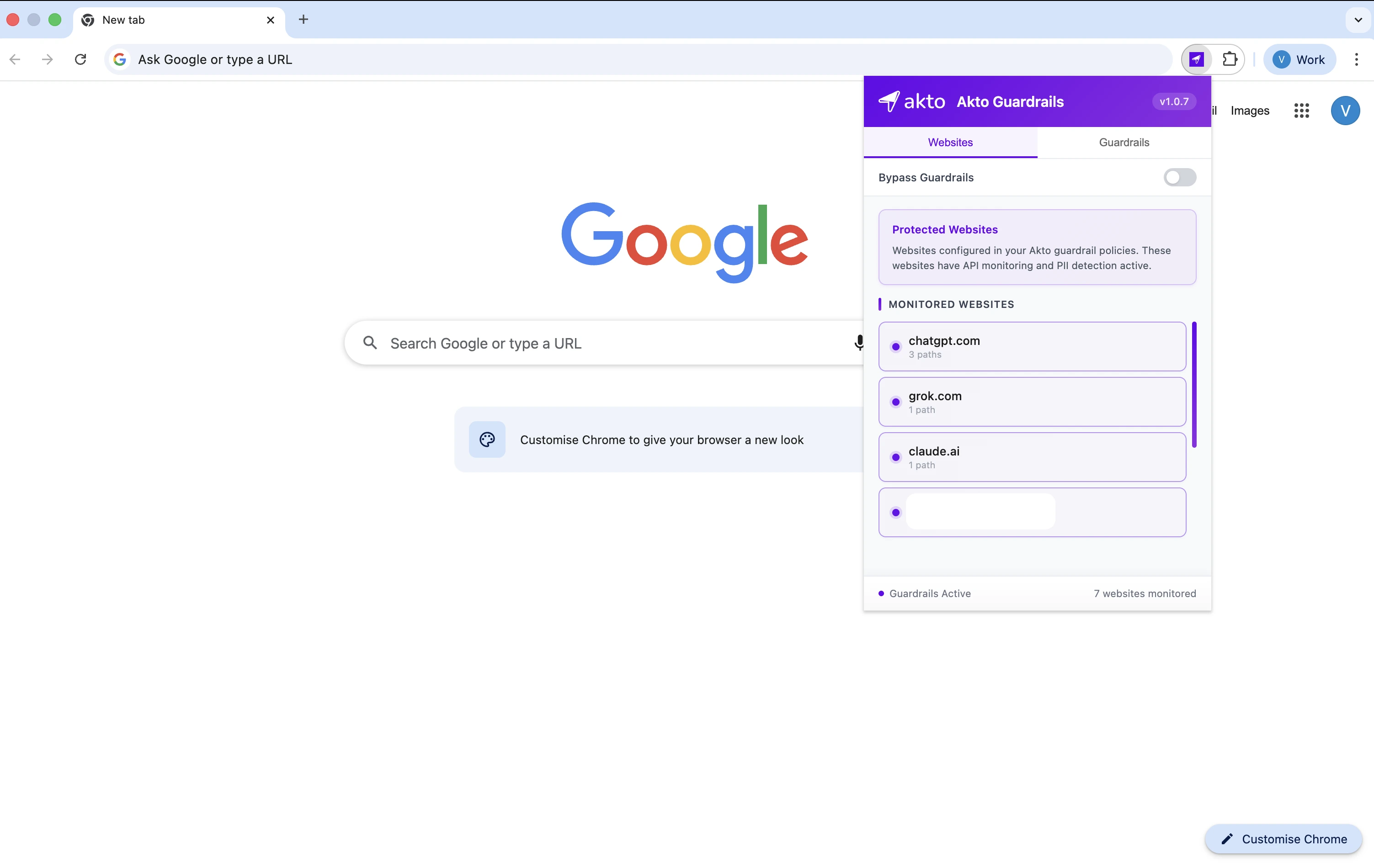
Managed Chrome browsers install the Akto extension after policy synchronisation. The Chrome toolbar then displays the Akto extension icon once installation completes.
## Support
For deployment assistance or troubleshooting, you can contact the Akto Support team at [**support@akto.io**](mailto:support@akto.io).
## What Next
Chrome extension installation completes enterprise deployment.
The next section explains how the Akto Chrome extension monitors browser activity and enforces guardrails during runtime.
.webp?alt=media)
.webp?alt=media)
.webp?alt=media)
.webp?alt=media)
.webp?alt=media)