> For the complete documentation index, see [llms.txt](https://ai-security-docs.akto.io/llms.txt). Markdown versions of documentation pages are available by appending `.md` to page URLs; this page is available as [Markdown](https://ai-security-docs.akto.io/akto-atlas-agentic-ai-security-for-employee-endpoints/ai-agent-activity/agentic-skills.md).
# Agentic Skills
## Overview
Agentic Skills are callable capabilities exposed by AI agents, each skill represents an action your agents can perform, mapped to underlying APIs or system operations. As skills become a primary attack vector for credential theft, prompt injection, and data exfiltration, understanding and securing your skill footprint is critical.
Akto discovers skills across your entire environment, analyzes each skill file for security risks, and enforces controls to prevent malicious skill execution.
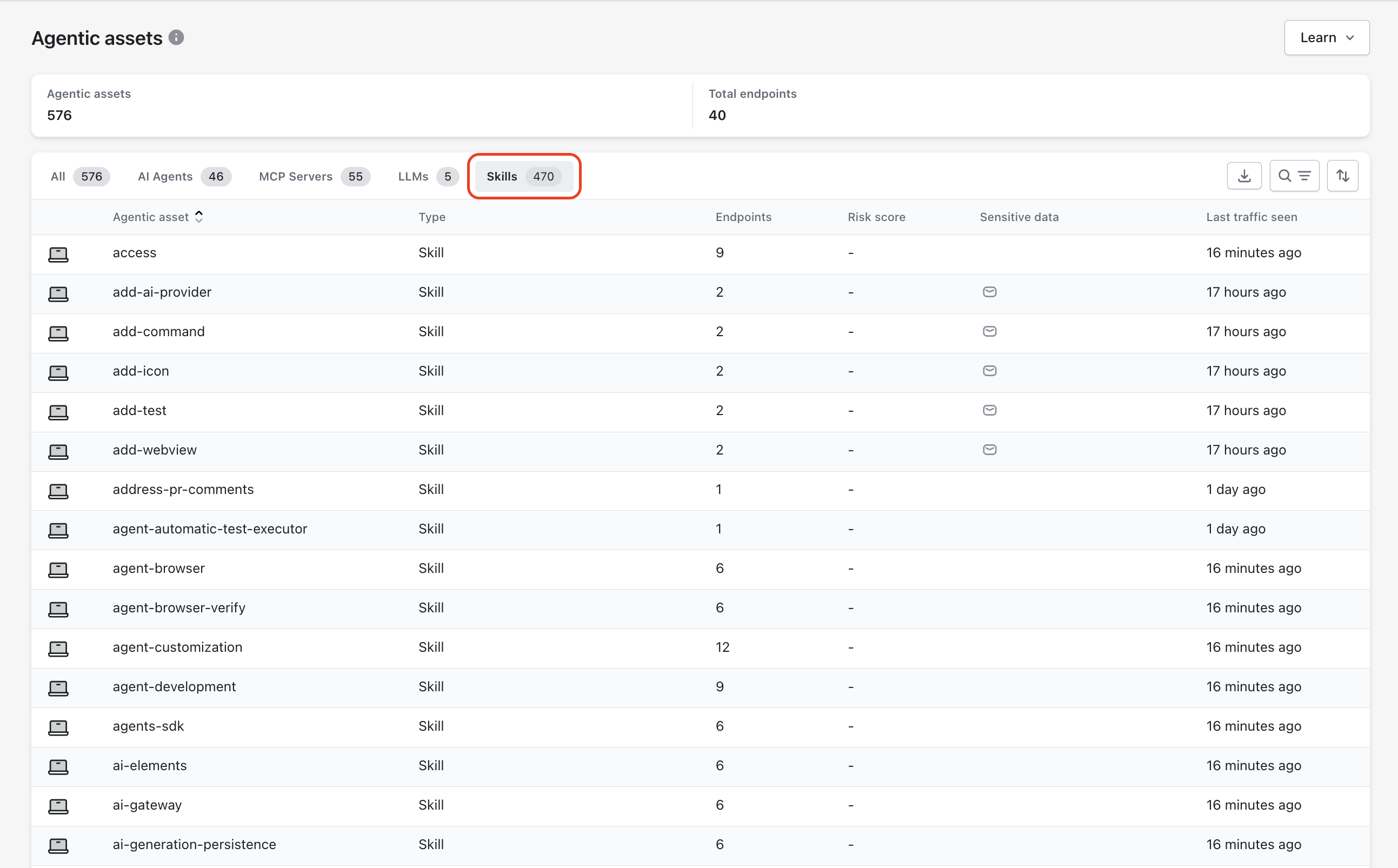
You can view skills by navigating through the Akto Atlas interface:
* **Akto Atlas → Agentic AI Discovery → Agentic Assets → Skills tab**
The Skills table shows endpoint coverage, sensitive data indicators, and last observed activity for each skill. The visibility into usage patterns helps you make informed enforcement decisions.
{% hint style="info" %}
**Skill Discovery Updates**
Akto continuously identifies skills configured in your agents.
**New skills are discovered every 6 hours.**\
Regular updates keep your inventory aligned with agent configuration changes.
{% endhint %}
## Discovery Sources
Akto discovers skill files across every surface where AI agents are configured and run. Discovery covers:
* **Local developer workstations**: skill files used by IDE-based agents such as Cursor, VS Code, and Claude Code
* **Source code repositories**: skill files committed to GitHub, GitLab, and Bitbucket, including nested directories such as `.claude/skills/`
* **CI/CD pipelines**: skill files present in pipeline configurations and build environments
* **MCP servers and AI agent runtimes**: skills loaded and exposed by locally running or networked MCP servers
* **Local developer skill directories**: skills loaded from developer-managed local paths outside of version control
* **Third-party registries and marketplaces**: skills pulled in from external sources or community registries
## Skill Inventory
Akto generates and maintains a continuous inventory of all skills currently in use across your environment. The inventory captures skill source, hosting location, associated agents, and last observed activity, giving you a complete, up-to-date picture of your skill footprint.
## Malicious Skill Detection
When a skill is discovered, Akto analyzes its content for security risks. Each skill is evaluated and assigned a risk score, helping you quickly surface high-risk capabilities and take action before they are exploited. Risk scores are visible across the **Skills**, **Users & Devices**, and **Agentic Assets** views.
Akto detects risks across three risk categories:
* **Sensitive Data Exposure**: hardcoded credentials and sensitive identifiers in skill content
* **Malicious Instructions & Prompt Injection**: injected or adversarial directives designed to override agent behavior
* **Embedded Code & Script Risks**: unsafe execution logic, reverse shells, and dependency vulnerabilities
Analysis runs at discovery time and on every subsequent change detected. For detailed threat context and examples of each risk category, see [OWASP Agentic Skills Top 10](/akto-atlas-agentic-ai-security-for-employee-endpoints/ai-agent-activity/agentic-skills/owasp-agentic-skills-top-10.md).
{% hint style="info" %}
**Runtime Enforcement**
At runtime, if an injected instruction surfaces during execution, the **PromptInjection Guardrail** in Agent Guard enforces blocking. See [Agent Guard → PromptInjection Guardrail](/agentic-guardrails/concepts/agent-guard.md) for detection logic and configuration.
{% endhint %}
## Auditing Skills
Once you identify skills that are malicious, over-privileged, or pose a risk to your environment, Akto gives you fine-grained controls to block them at the device or agent level.
### Block Skills by Device
You can block a skill directly from the Skills view by selecting the devices where enforcement should apply. Device selection automatically includes all agents running on the selected endpoints.
This approach helps you restrict a capability only where required while allowing normal operation elsewhere.
**Steps to Block a Skill for Selected Devices**
{% stepper %}
{% step %}
Navigate the **Skills** tab under Agentic Assets.
{% endstep %}
{% step %}
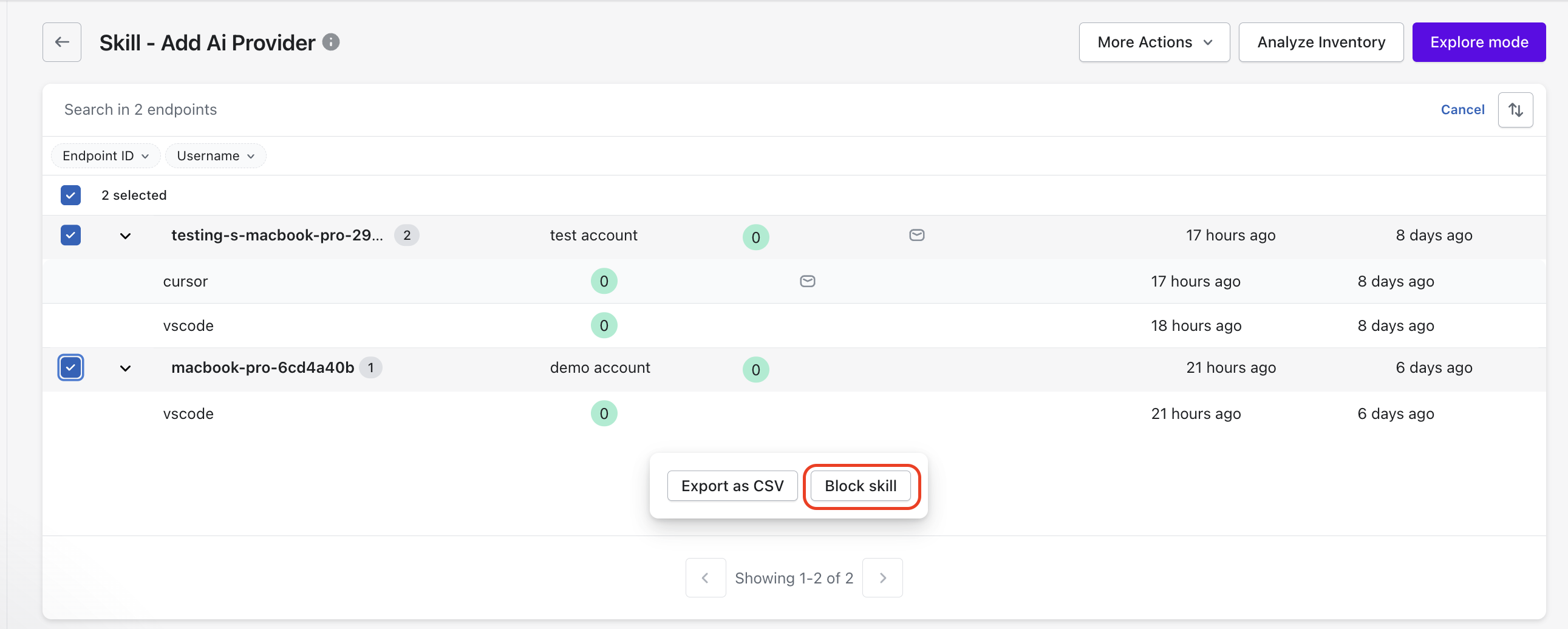
Select the skill that you want to restrict and open its skill details view.
{% endstep %}
{% step %}
Select the endpoint IDs (devices) where you want to block the skill.
{% endstep %}
{% step %}
Click **Block skill** from the action bar at the bottom.
{% endstep %}
{% step %}
Confirm the blocking action.
{% endstep %}
{% endstepper %}
**Expected Result After Blocking**
Akto prevents execution of the selected skill on all chosen devices.\
All agents running on the selected endpoint IDs lose access to the blocked skill.\
Agents on other devices continue to use the skill without interruption.
### Block Skills by Agent
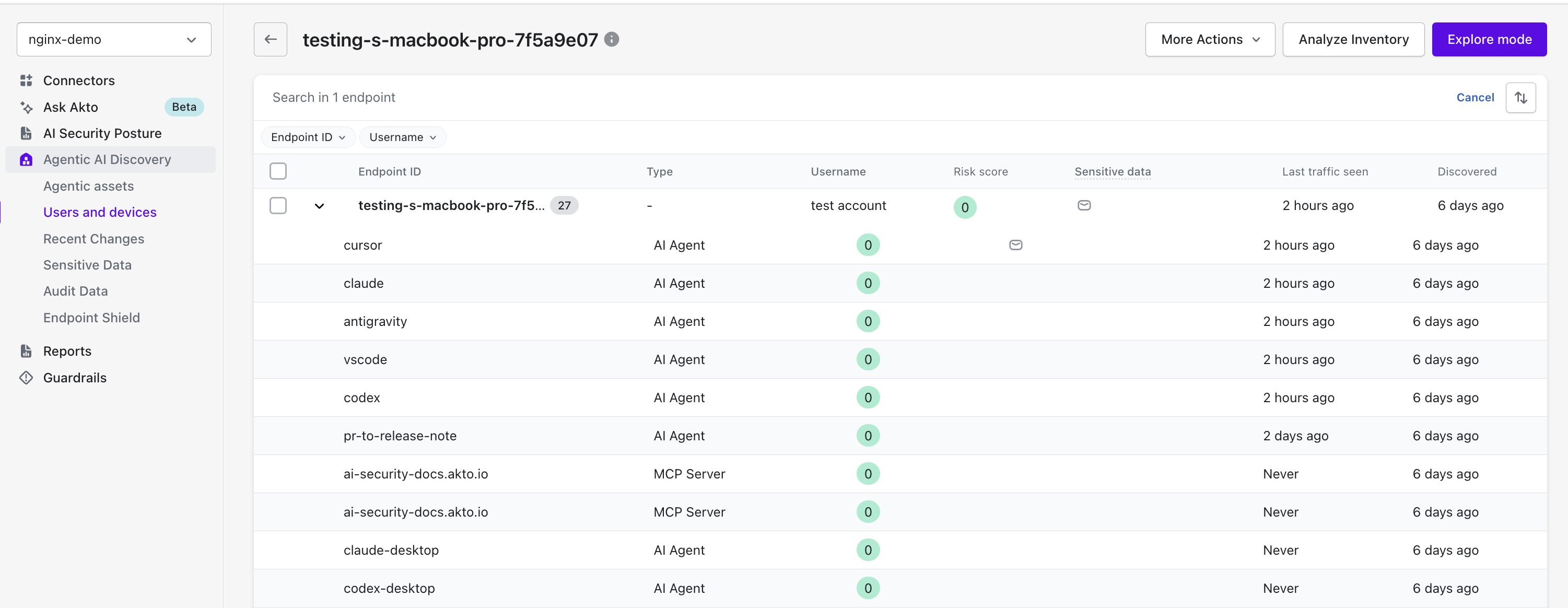
You can block skills for a specific agent within a specific device using the Users and Devices view. Agent-level enforcement allows you to apply tighter controls without affecting other agents on the same device.
This approach supports environments where different agents require different access levels.
**Steps to Block Skills for a Specific Agent**
{% stepper %}
{% step %}
Navigate to **Users and Devices**.
{% endstep %}
{% step %}
Select the device where you want to enforce the restriction.
{% endstep %}
{% step %}
Open the list of agents associated with the selected device and select the agent.
{% endstep %}
{% step %}
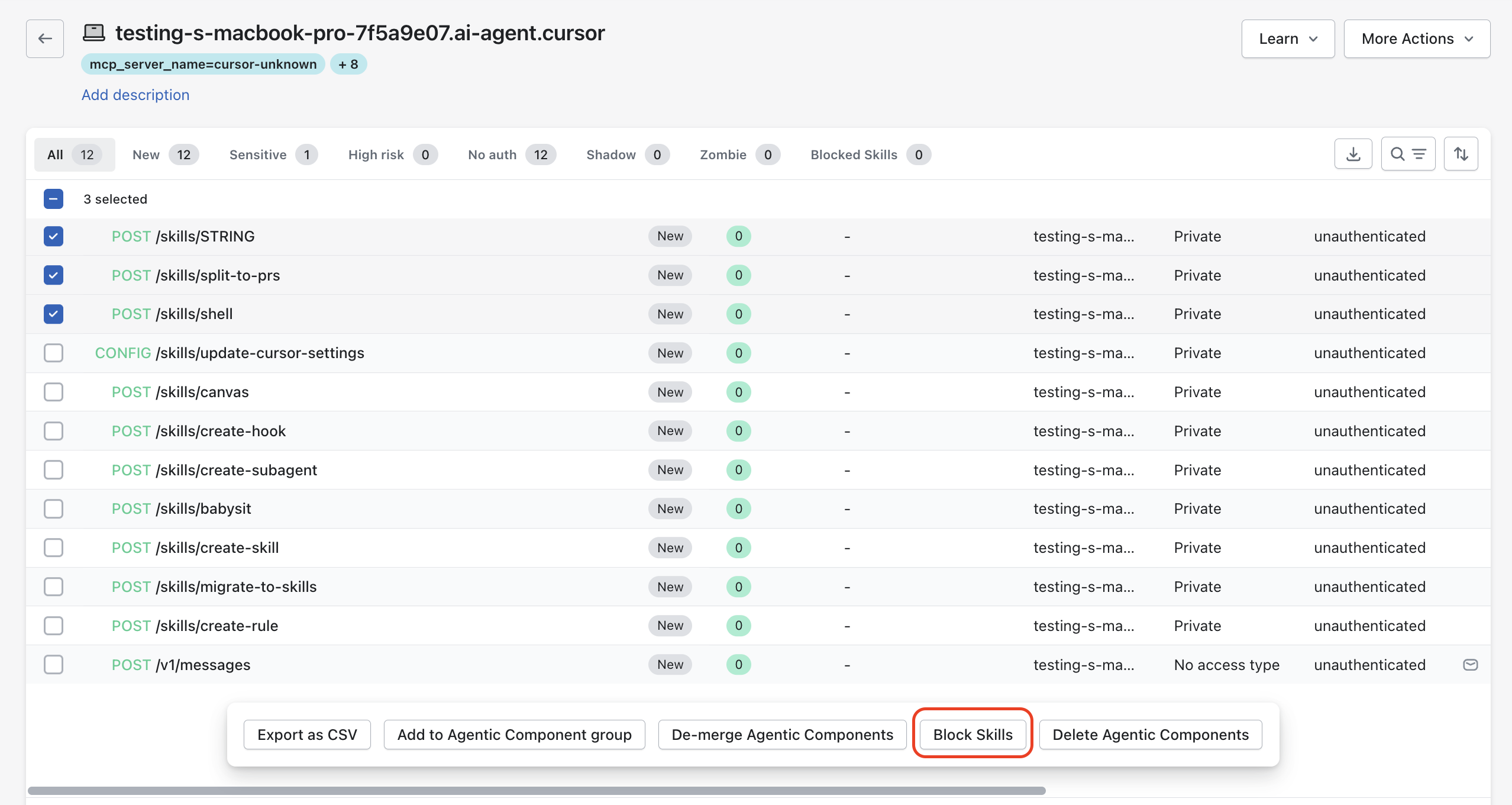
Choose the skills that you want to block.
{% endstep %}
{% step %}
Click **Block Skills** from the action bar.
{% endstep %}
{% step %}
Confirm the blocking action.
{% endstep %}
{% endstepper %}
**Expected Result After Blocking**
Akto blocks execution of the selected skills only for the chosen agent on the selected device.\
Other agents on the same device retain access unless explicitly restricted.\
Agents on other devices continue to operate without any impact.
## Akto Guardrails
Akto monitors agent behavior at runtime to detect dangerous actions triggered by skill execution and enforce policy-based restrictions in real time through agentic guardrails.
### What Akto Monitors
* **Agent tool usage**: file access, shell commands, and network calls initiated by skill execution
* **Skill-triggered system actions**: system-level operations spawned directly by a skill
* **Data movement**: files, environment variables, or sensitive content leaving the endpoint
* **Outbound network activity**: destinations contacted during or after skill execution
### What Akto Detects
* Data exfiltration: environment variable leakage, credential forwarding, or file uploads to external destinations
* Unauthorized filesystem activity: access to sensitive paths such as `.env` files or credential stores
* Anomalous tool invocation patterns: unusual sequences or frequencies of tool calls that indicate abuse
* Pre-authorized dangerous tools configured within skill definitions
### Enforcement
Akto enforces controls in real time without requiring manual intervention:
* **Block dangerous commands** immediately upon detection
* **Restrict filesystem access** to sensitive paths based on policy
* **Limit outbound destinations** to approved endpoints only
**Integrations**
* **EDR / XDR platforms**: Akto correlates skill-triggered events with endpoint telemetry for unified threat visibility
* **Runtime agent gateways and proxies**: Akto integrates with agent middleware to enforce controls at the execution layer
## Governance & Compliance
### Skill Allowlists & Approval Workflows
Akto gives you controls to govern which skills can be introduced and activated across your environment.
* Maintain **approved skill registries** and allowlists to define which skills are permitted
* Require **approval workflows** before new skills can be introduced to a team or project
* Enforce **code review gates** so skill files go through review before activation
* Apply **policy gating** to prevent skills from being activated without explicit authorization
### Usage Tracking & Compliance Reporting
* Track skill usage across teams, projects, and devices
* Generate compliance reports covering skill inventory and usage history
* Align skill governance with security and regulatory requirements
## Detection Coverage
Akto measures detection effectiveness across four key risk categories for skills:
| Risk Category | What Is Measured |
| ------------------------ | -------------------------------------------------------------------------------------------------------- |
| **Prompt Injection** | Detection rate for injected instructions within skill files |
| **Malicious Scripts** | Detection rate for dangerous execution logic embedded in or linked from skills |
| **Credential Leakage** | Detection rate for hardcoded secrets and sensitive identifiers in skill content |
| **Supply Chain Attacks** | Detection rate for compromised or malicious skills introduced via third-party registries or repositories |
{% hint style="info" %}
Detection rates are measured against a benchmark set of known-malicious skill samples covering each risk category. Methodology details are available on request.
{% endhint %}
## Continue with Guardrails
Agentic Skills shows you what your agents can do. Guardrails control what they are allowed to do.
You can:
* Map skills to guardrail policies
* Enforce restrictions on sensitive actions
* Monitor violations
Refer to:
* [Agentic Guardrails](/agentic-guardrails/overview.md)
* [Guardrail Policies](/agentic-guardrails/concepts/threat-policy.md)