> For the complete documentation index, see [llms.txt](https://ai-security-docs.akto.io/llms.txt). Markdown versions of documentation pages are available by appending `.md` to page URLs; this page is available as [Markdown](https://ai-security-docs.akto.io/akto-atlas-agentic-ai-security-for-employee-endpoints/ai-agent-activity/agentic-plugins.md).
# Agentic Plugin Discovery
## Overview
An AI plugin is a packaged extension that adds new capabilities to an AI agent. A single install can bundle skills, commands, sub-agents, hooks, scripts, and MCP servers, so one plugin can teach an agent a new workflow, connect it to an external system, inspect prompts, or run code at specific points in the agent's lifecycle.
Employees install plugins in minutes, at the user or project level, usually without security review. Security may have approved Claude, Codex, or GitHub Copilot. It has not necessarily approved everything installed inside them.
Akto discovers every plugin running across your workforce, expands each plugin into the components it ships (MCP servers, skills), traces it back to the marketplace it came from, and shows how far it has spread across endpoints.
You can view plugins by navigating through the Akto Atlas interface:
* **Akto Atlas → Agentic AI Discovery → Agentic Assets → Plugins (Beta) tab**
{% hint style="info" %}
Plugin discovery currently covers **Claude** (CLI, Desktop, Cowork), **Codex**, and **GitHub Copilot**.
{% endhint %}
## Discovery Sources
Akto discovers plugins through [AI Endpoint Shield](/akto-atlas-agentic-ai-security-for-employee-endpoints/endpoints-discovery-agents/ai-endpoint-shield.md), the background agent deployed to your employees' devices.
Endpoint Shield reads the plugin configuration for every supported agent on the device, Claude (CLI, Desktop, Cowork), Codex, and GitHub Copilot, at the user, project, and desktop scopes, and reports each plugin back to Akto along with the components it ships, its marketplace source, and whether it's enabled or disabled.
Because discovery happens on the endpoint itself, Akto also picks up project-scoped plugins pulled in from a repository the moment an employee clones and trusts that project on a protected device, without a separate repository integration.
## Plugin Inventory
The Plugins tab brings plugins into the same inventory as the agents that load them. Each row carries the context an isolated file, process, or agent admin console cannot give you on its own.
| Column | What It Tells You |
| -------------- | ------------------------------------------------------------------------------------------------------------------------------------------------- |
| Plugin name | The installed plugin, for example `figma`, `github`, `frontend-design`, `superpowers`, `claude-md-management` |
| Type | Asset type in the Agentic Assets inventory, shown as `Plugin` |
| AI Agent | The agent loading the plugin: Claude CLI, Claude Cowork, Claude Desktop, Codex, or GitHub Copilot |
| Endpoints | How many devices the plugin is installed on, so you can tell one developer's experiment from workforce-wide spread |
| Risk score | Akto's score for the plugin and its components, used to prioritize investigation |
| Sensitive data | Sensitive data types observed in the plugin's content or in the traffic its components generate |
| Status | Whether the plugin is currently enabled or disabled on the endpoint |
| Scope | Where the plugin is installed on the endpoint, as reported by the agent's own configuration. See [Install Scope](#install-scope) below |
| Marketplace | The source it was installed from, for example `claude-plugins-official`, `openai-bundled`, `openai-curated`, `awesome-copilot`, `copilot-plugins` |
Marketplace provenance matters as much as the plugin name. A plugin from an approved internal marketplace has a different trust profile from one pulled from an unfamiliar public repository.
## Install Scope
Scope tells you where a plugin is installed on the endpoint, which determines how much of the employee's work it applies to. The same plugin installed at user scope reaches every project on the machine, while a project-scoped install reaches one repository.
| Scope | What It Means |
| --------- | ----------------------------------------------------------------------------------------------------------- |
| `user` | Installed for the logged-in user and active across all of that user's projects on the endpoint |
| `project` | Installed for a single project or working directory, usually from configuration committed to the repository |
| `desktop` | Installed in a desktop agent's own configuration, such as Claude Desktop or Claude Cowork |
| `-` | The agent does not report an install scope |
Scope is read from the agent's configuration, so the values available depend on the agent. Claude surfaces report install scope, while agents that do not expose it show `-`.
Two things follow from this when you triage:
* A user-scoped or desktop-scoped install is broader than a project-scoped one, so treat it as higher exposure at the same risk score.
* A project-scoped install means the plugin configuration is likely in a repository, so it reaches every developer who clones and trusts that project, not only the endpoint where Akto first observed it.
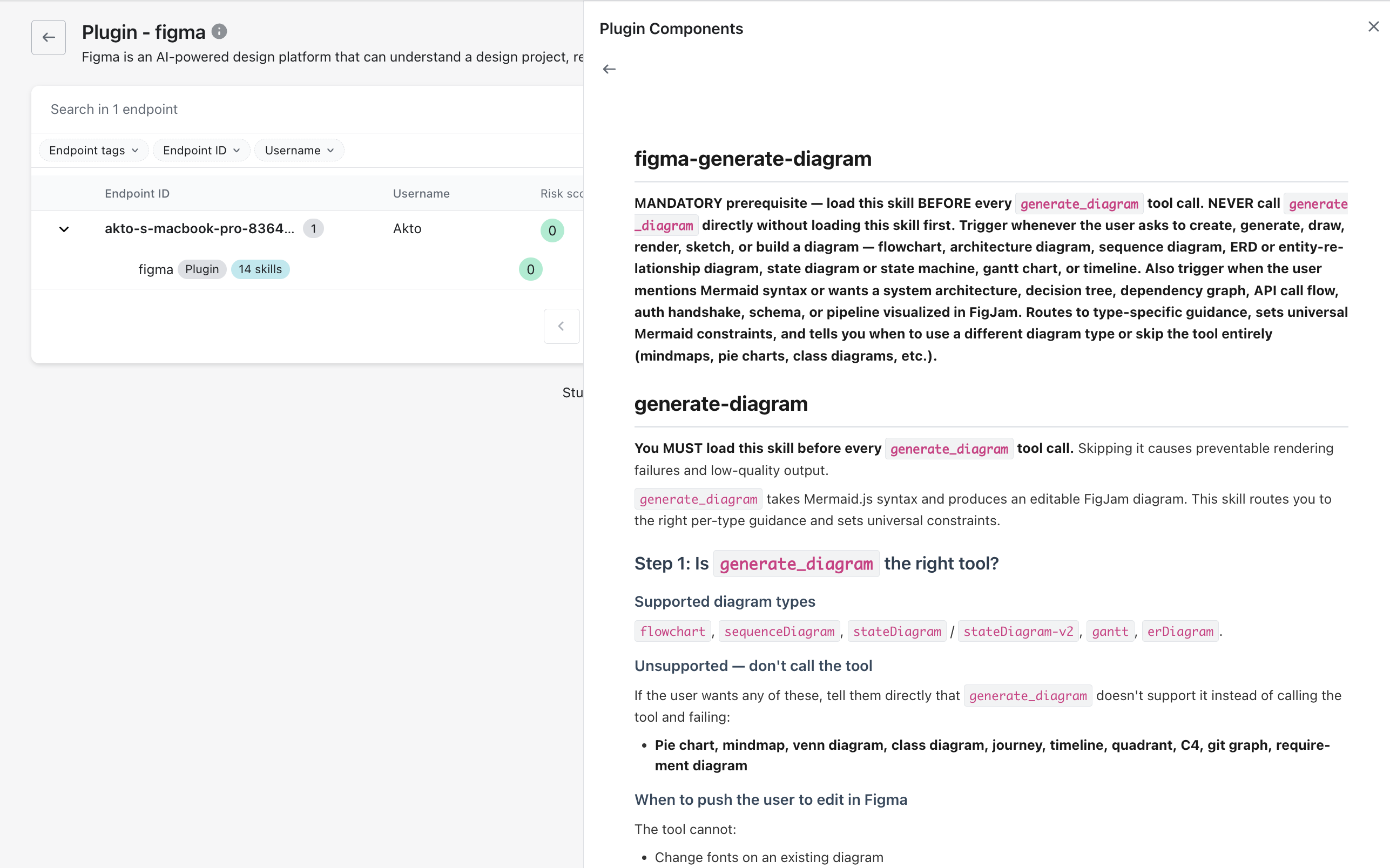
## Plugin Components
A plugin is a bundle, so the plugin name alone does not tell you what the agent can now do. Akto expands each discovered plugin into its components and lists them with their type.
Open any plugin from the Plugins tab to see:
* The plugin description and what it is built to do
* Every endpoint (device) it is installed on, with the username and risk score for each
* The full component list under **Plugin Components**
Akto discovers the following component types inside plugins:
* **MCP servers**: local or networked servers the plugin registers, along with the tools and resources they expose
* **Skills**: callable capabilities the plugin adds to the agent
Components discovered through a plugin appear in their own inventories as well. An MCP server bundled in a plugin shows up under the **MCP Servers** tab, and its skills show up under the [Skills](/akto-atlas-agentic-ai-security-for-employee-endpoints/ai-agent-activity/agentic-skills.md) tab, each still linked back to the plugin that installed it.
Select any component to view its full definition, for example a skill's complete instructions, exactly as the agent loads it.
One plugin install can add dozens of callable capabilities. Reviewing the plugin without reviewing its components leaves most of the new access unexamined.
## What Next
This page covers plugin discovery only. For the components a plugin ships and the inventory it belongs to, see:
* [Agentic Assets](/akto-atlas-agentic-ai-security-for-employee-endpoints/ai-agent-activity/agentic-assets.md) — the full inventory Plugins is one tab of, alongside AI Agents, MCP Servers, LLMs, and Skills
* [Agentic Skills](/akto-atlas-agentic-ai-security-for-employee-endpoints/ai-agent-activity/agentic-skills.md) — how a plugin's bundled skills are discovered and analyzed once they're broken out