> For the complete documentation index, see [llms.txt](https://ai-security-docs.akto.io/llms.txt). Markdown versions of documentation pages are available by appending `.md` to page URLs; this page is available as [Markdown](https://ai-security-docs.akto.io/akto-argus-agentic-ai-security-for-homegrown-ai/connectors/ai-agent-security/arcade.md).
# Arcade
Integrate arcade.dev with Akto Argus
## Overview
Arcade is a real-time traffic processing engine that enables secure collection and forwarding of network events into Akto for runtime API visibility and analysis. This integration lets you capture API traffic and metadata from Arcade and send it into your Akto environment for security monitoring and enforcement.
The Arcade Integration automatically:
* Collects API request and response metadata from your Arcade deployment.
* Forwards structured traffic events to Akto’s Traffic Processor.
* Supports downstream security analysis and dashboard visualization in Akto.
## Steps to Connect
{% stepper %}
{% step %}
**Configure Akto Traffic Processor**
Set up and configure your Traffic Processor. The steps are mentioned [here](/akto-argus-agentic-ai-security-for-homegrown-ai/connectors/others/hybrid-saas.md).
{% hint style="warning" %}
**Important**
Keep the your Data ingestion URL ready. It will be required in the next steps.
{% endhint %}
{% endstep %}
{% step %}
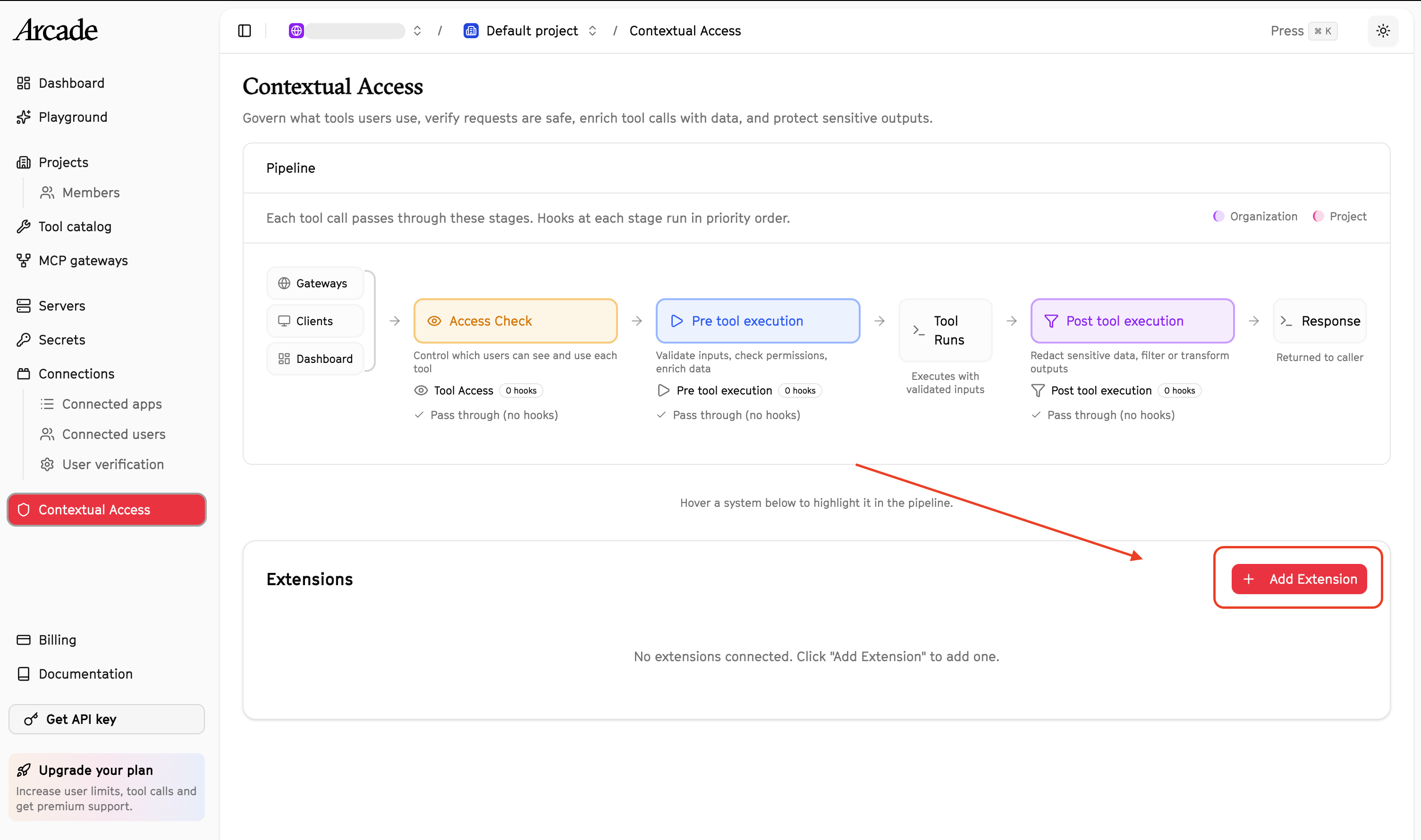
**Navigate to Contextual Access in Arcade**
1. Log in to your Arcade Dashboard.
2. From the left navigation panel, select **Contextual Access**.
3. Under the **Extensions** section, click **Add Extension**.
{% endstep %}
{% step %}
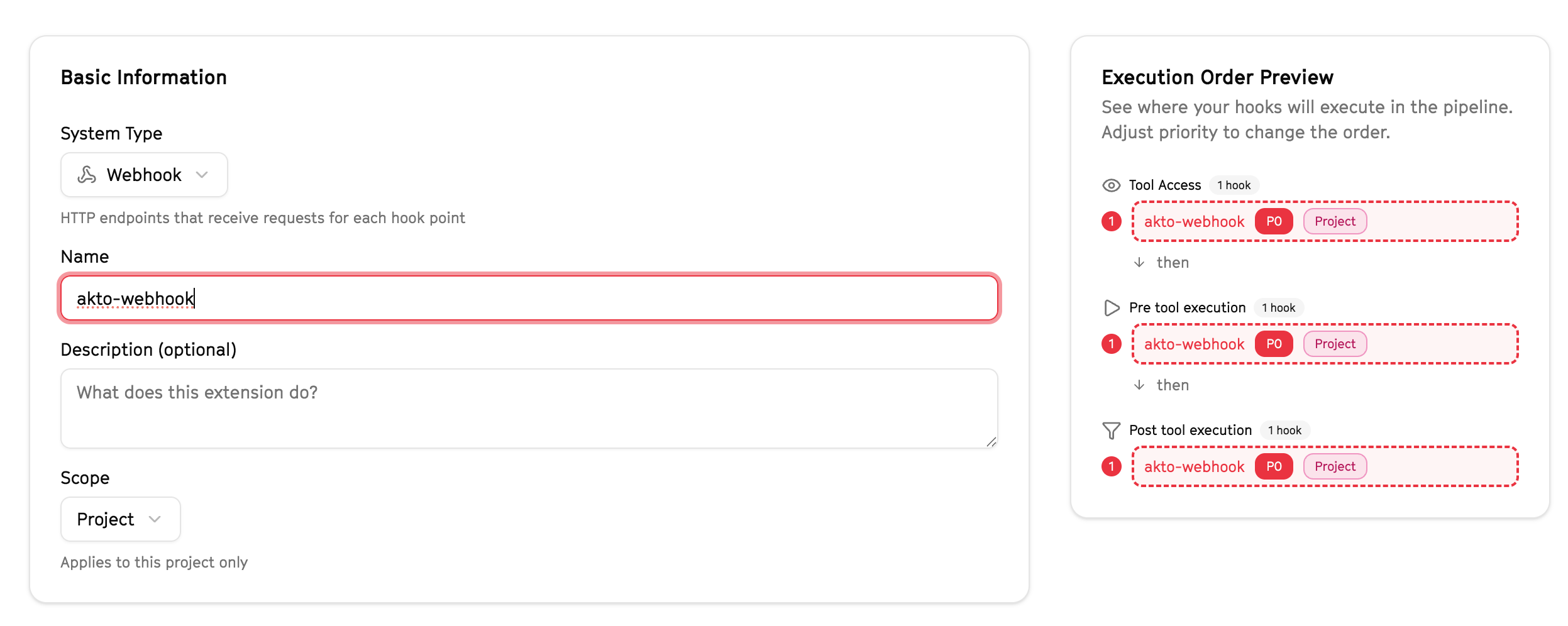
**Create a New Webhook Extension**
In the **Add Extension** screen enter the Basic Information such as:
* **System Type:** Select `Webhook`
* **Name:** Provide a descriptive name (e.g., `Akto Security Integration`)
* **Description (optional):**\
Example:\
`Forwards tool execution events to Akto Traffic Processor for security analysis`
* **Scope:** Select the appropriate scope (Project or Organization)
{% endstep %}
{% step %}
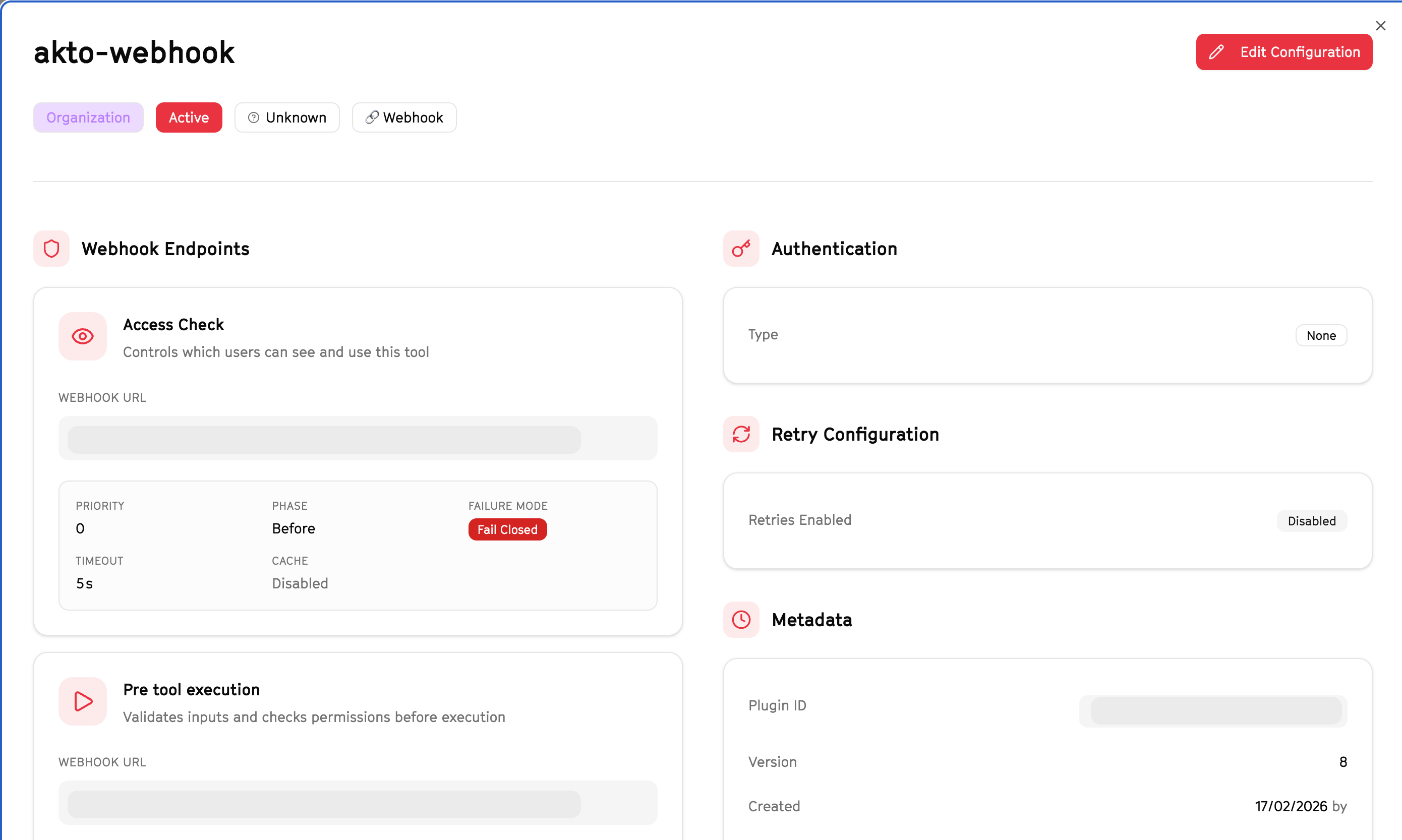
**Configure Webhook Endpoints**
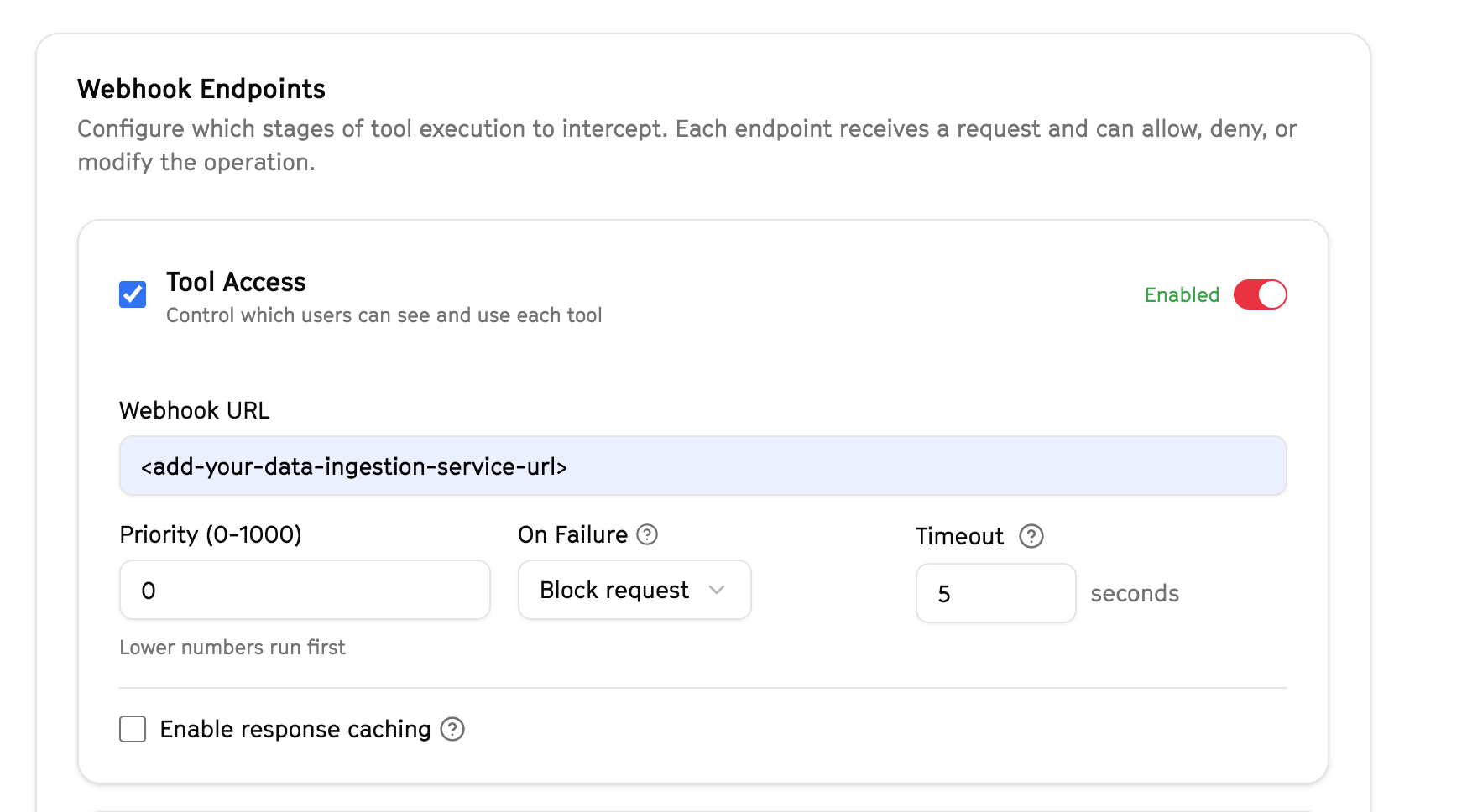
Under **Webhook Endpoints**, configure the execution stages that should be intercepted.
{% hint style="warning" %}
**Note**
You must enter your Akto Traffic Processor ingestion URL in each enabled stage.\
All other fields can be left as default unless you require a custom configuration.
{% endhint %}
**1. Tool Access**
Enable **Tool Access** if you want Akto to control which users can see or use specific tools.
**Configure:**
* **Webhook URL:**\
Enter your Data Ingestion ingestion endpoint:
```
```
* **Priority:** Leave as default (`0`) unless you need custom execution ordering.
* **On Failure:** Controls what arcade.dev does if Akto's webhook is unreachable or returns an error. Set to `Allow request` to let the tool call proceed when Akto is unavailable, or `Block request` to deny the call if Akto cannot be reached.
* **Timeout:** Leave default (recommended: 5 seconds).
* **Response Caching:** Keep disabled unless explicitly required.
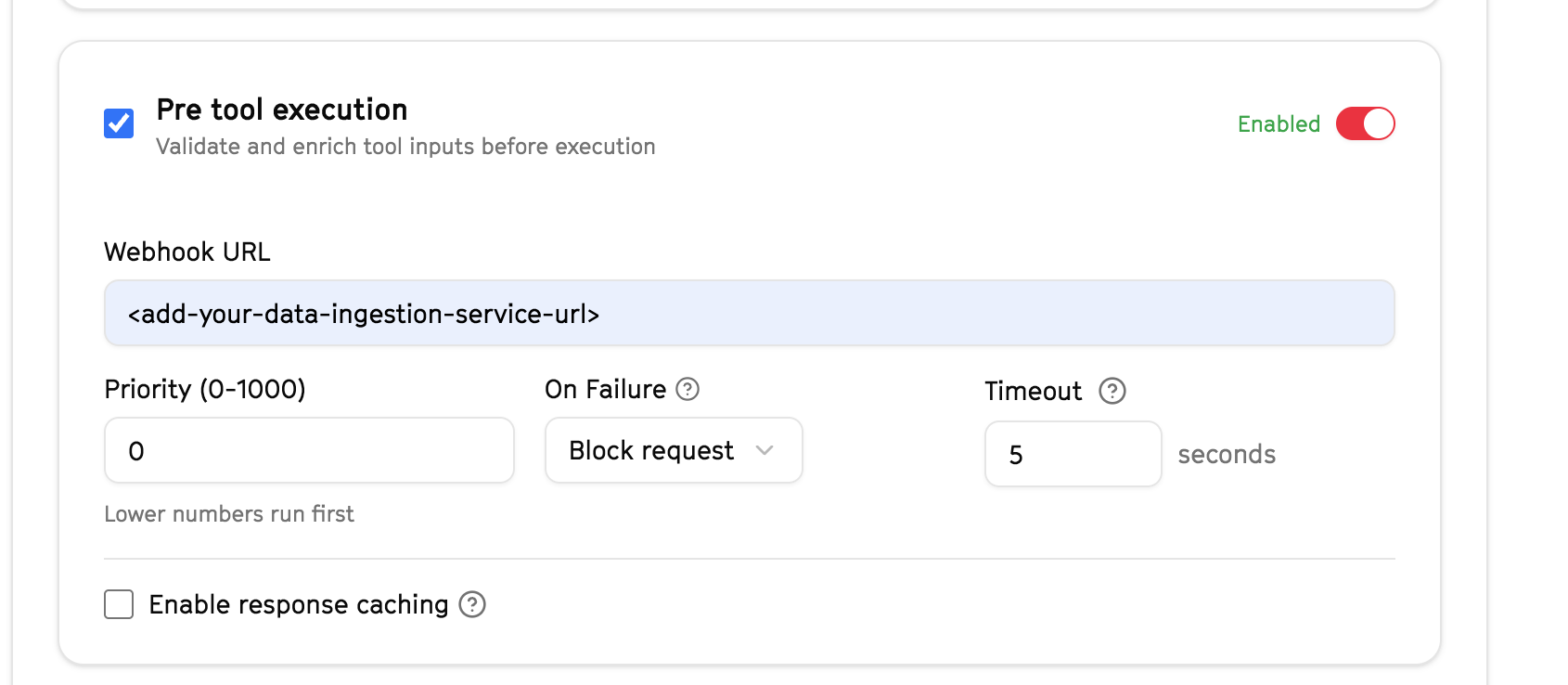
**2. Pre Tool Execution**
Enable **Pre tool execution** to validate and inspect tool inputs before the tool runs.
**Configure:**
* **Webhook URL:**
```
```
* Leave **Priority**, **Timeout**, and other fields as default unless you require custom behaviour.
* **On Failure:** Controls what arcade.dev does if Akto's webhook is unreachable or returns an error. Set to `Allow request` to let the tool call proceed when Akto is unavailable, or `Block request` to deny the call if Akto cannot be reached.
{% hint style="info" %}
**Blocking vs Async Mode**
* **Blocking mode (default):** Keep **Pre Tool Execution** enabled. Akto evaluates tool inputs before execution and can block unsafe or policy-violating calls.
* **Async / monitoring-only mode:** Disable **Pre Tool Execution** and rely solely on Post Tool Execution. Tool calls will not be intercepted — Akto will only observe and record outputs after execution. Use this when you want visibility without enforcement.
{% endhint %}
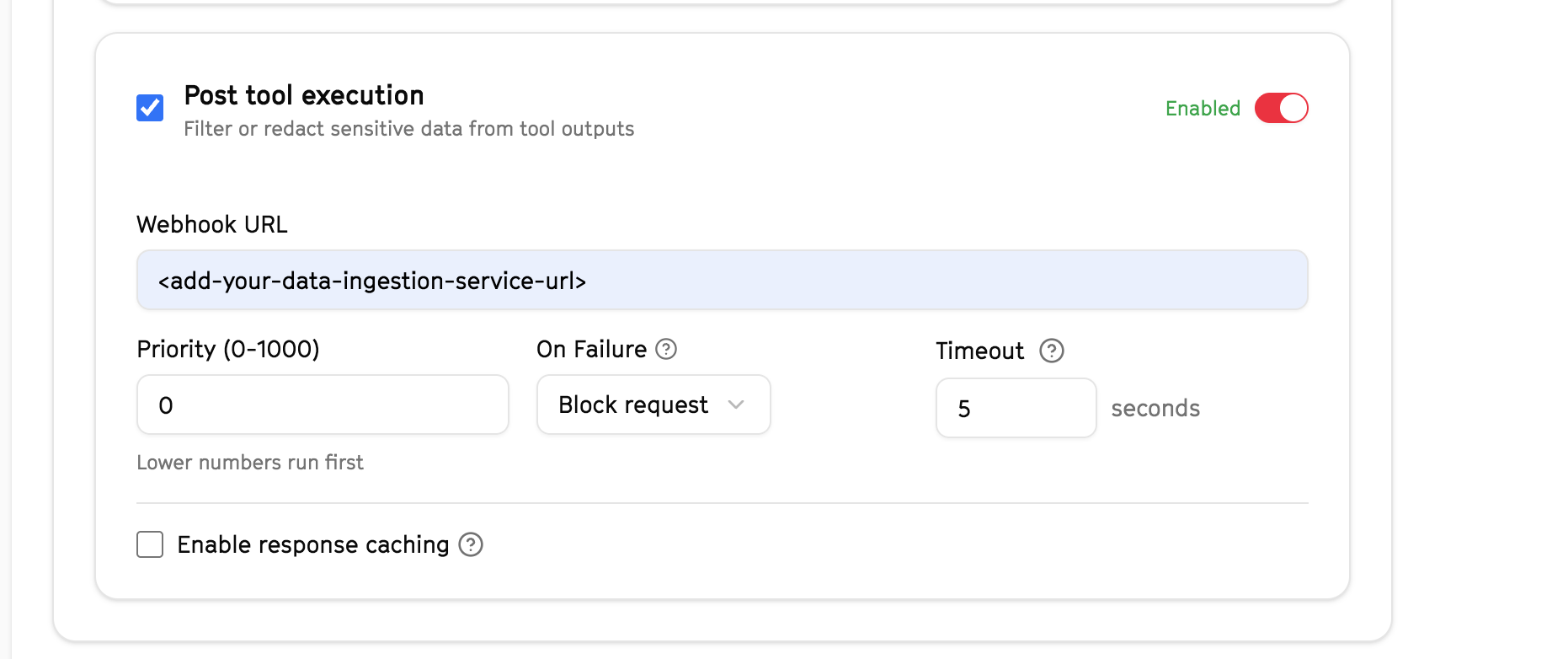
**3. Post Tool Execution**
Enable **Post tool execution** to inspect tool outputs after execution.
**Configure:**
* **Webhook URL:**
```
```
* Leave **Priority**, **Timeout**, and other fields as default unless custom configuration is required.
* **On Failure:** Controls what arcade.dev does if Akto's webhook is unreachable or returns an error. Set to `Allow request` to let the tool call proceed when Akto is unavailable, or `Block request` to deny the call if Akto cannot be reached.
{% endstep %}
{% step %}
**Save and Enable the Extension**
After configuring all required webhook stages:
1. Click **Add Extension** present in the top right corner.
2. Ensure the extension is marked as **Enabled**.
3. Review the **Execution Order Preview** to confirm hooks are active.
{% endstep %}
{% endstepper %}
## Data Collected
The Arcade integration captures:
### Tool Access Events
* Tool visibility decisions
* User metadata
* Access enforcement decisions
### Pre-Execution Data
* Tool input payloads
* Validation and policy enforcement results
### Post-Execution Data
* Tool output payloads
* Redaction or blocking decisions
## Get Support
If you need assistance with the Snowflake connector:
* **In-app Chat**: Use the chat widget in your Akto dashboard for instant support
* **Discord Community**: Join our community at [discord.gg/Wpc6xVME4s](https://discord.gg/Wpc6xVME4s)
* **Email Support**: Contact us at
* **Contact Form**: Submit a support request at
Our team is available 24/7 to help with setup, troubleshooting, and best practices.