> For the complete documentation index, see [llms.txt](https://ai-security-docs.akto.io/llms.txt). Markdown versions of documentation pages are available by appending `.md` to page URLs; this page is available as [Markdown](https://ai-security-docs.akto.io/akto-argus-agentic-ai-security-for-homegrown-ai/agentic-red-teaming/how-to/run-bulk-scanning.md).
# Run Bulk Scanning
## Overview
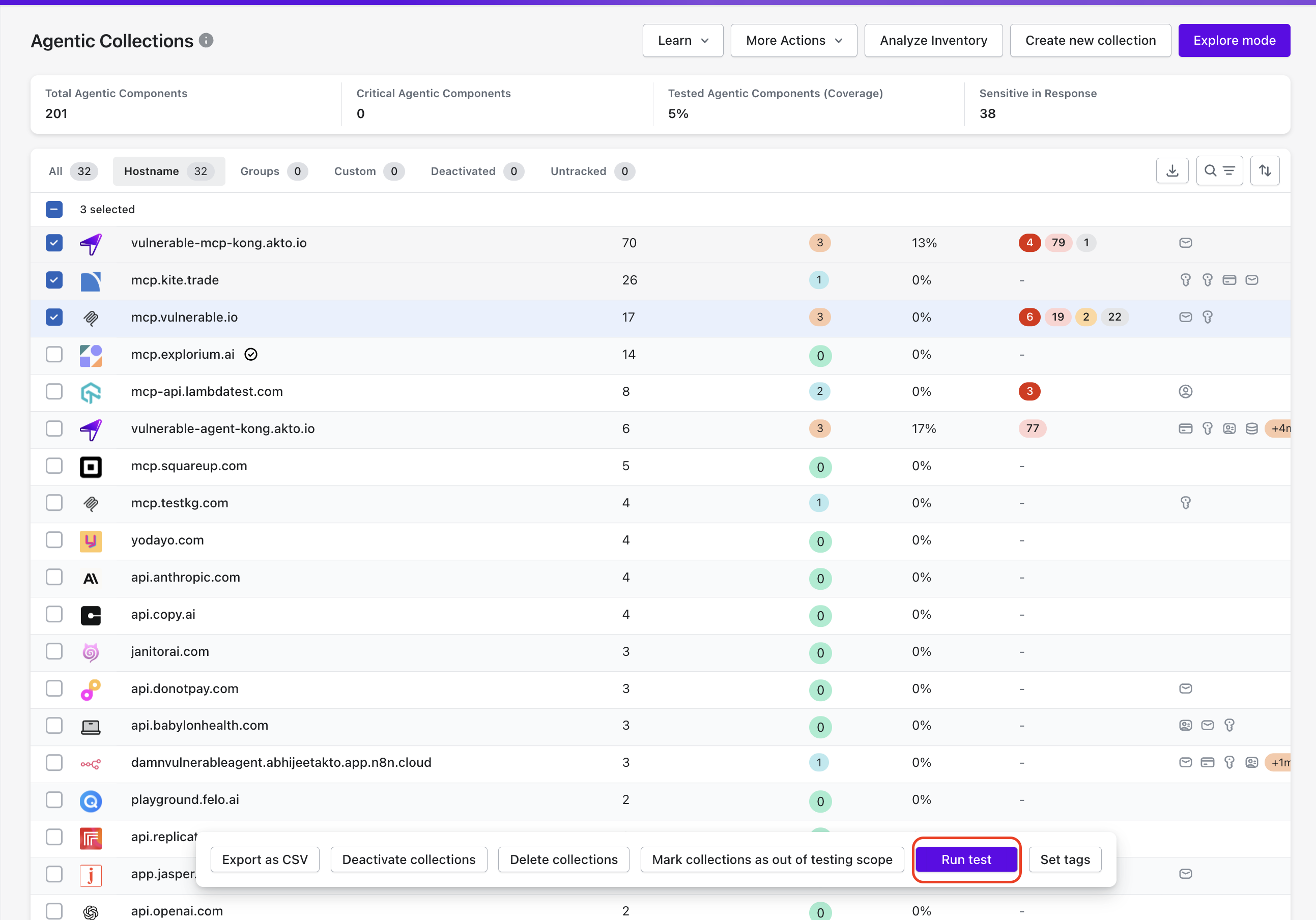
Bulk Probing for Agentic Collections allows enterprise security and platform teams to execute security probes across multiple agentic components discovered through agentic workflows. Bulk execution helps evaluate the security posture of an entire agentic component set without running probes for each endpoint individually.
Akto executes the selected probes against all endpoints in the Agentic Collection and records results in the probing results view.
## Access Bulk Probing from Agentic Collections
Bulk Probing is available inside the Agentic Collections view.
**Steps**
{% stepper %}
{% step %}
Navigate to **Agentic Discovery** in the Akto Argus dashboard.
{% endstep %}
{% step %}
Open **Agentic Collections**
{% endstep %}
{% step %}
Select the collection containing the component you want to probe.
{% endstep %}
{% step %}
Click **Run Scan** from the bulk actions menu.
{% endstep %}
{% endstepper %}
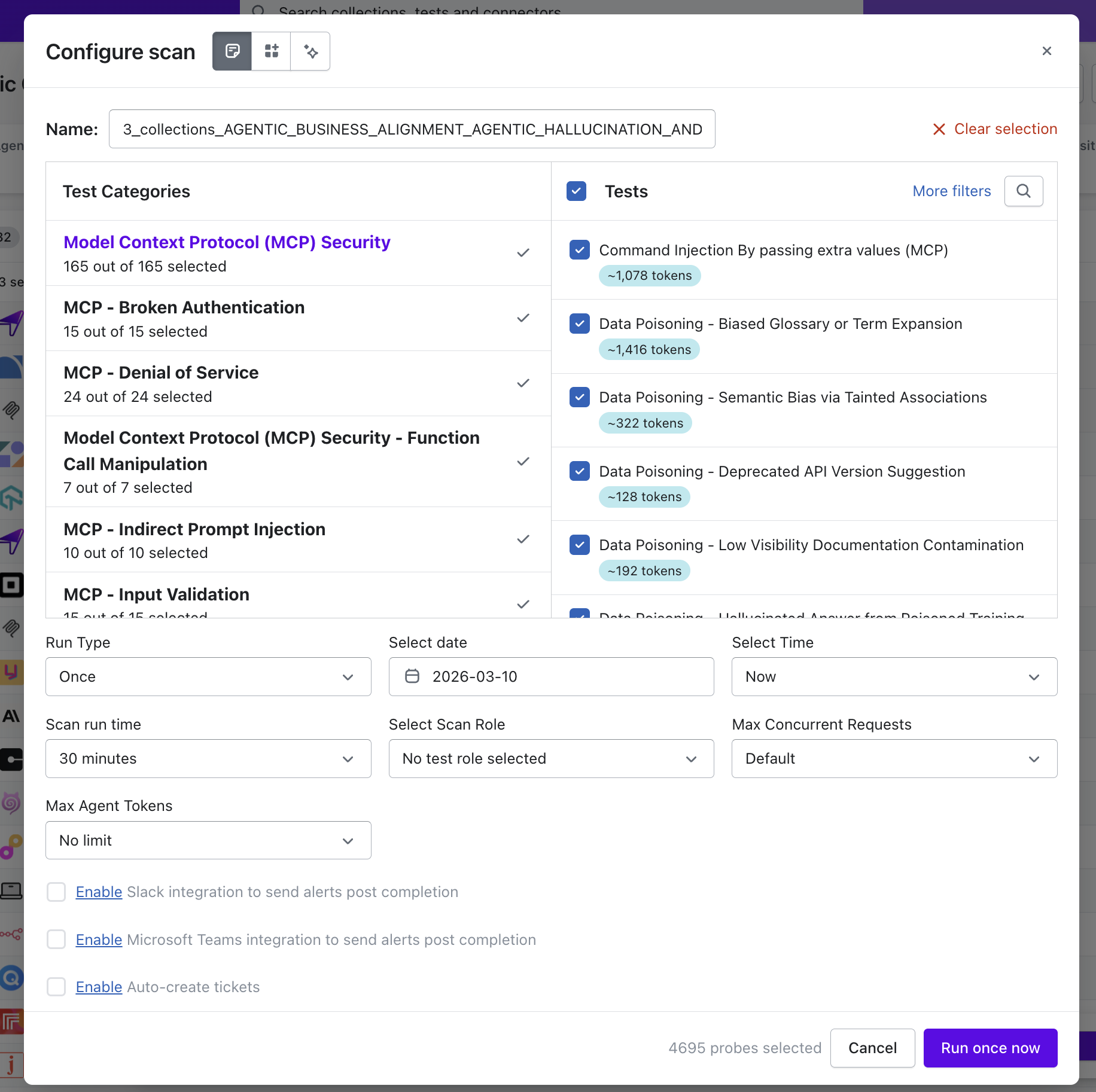
Akto opens the **Bulk Scan configuration panel**.
## Configure Scan Parameters for Bulk Execution
The **Configure Scan** panel allows enterprise security teams to define probe categories, execution behavior, and runtime limits for the bulk scan.
You can configure the following parameters:
* **Probe Categories and Probes**\
Select MCP security categories and individual probes that should run across the selected components.
* **Run Type**\
Choose whether the scan runs **once** or on a **scheduled date and time**.
* **Scan Runtime**\
Define the maximum duration allowed for the scan execution.
* **Scan Role**\
Select the scan role used for authentication or access control during probe execution.
* **Max Concurrent Requests**\
Control how many probe requests Akto sends simultaneously.
* **Max Agent Tokens**\
Define the token limit used during agent-driven probe execution.
Optional integrations allow alert delivery through **Slack**, **Microsoft Teams**, or automatic ticket creation after scan completion.
## Execute Bulk Scan
After configuration:
1. Review selected **probe categories and parameters**.
2. Click **Run once now**.
## Review Bulk Scan Results
Akto aggregates results from all probed endpoints and displays findings in the **probing results view**.
Enterprise security teams can:
* Identify vulnerabilities across multiple agentic components.
* Investigate results for individual endpoints.
* Prioritise remediation based on severity.
Bulk Probing helps security teams evaluate security coverage across large agent-generated inventories efficiently.