> For the complete documentation index, see [llms.txt](https://ai-security-docs.akto.io/llms.txt). Markdown versions of documentation pages are available by appending `.md` to page URLs; this page is available as [Markdown](https://ai-security-docs.akto.io/akto-argus-agentic-ai-security-for-homegrown-ai/agentic-red-teaming/get-started/manual-import/ai-agent-import.md).
# AI Agent Import
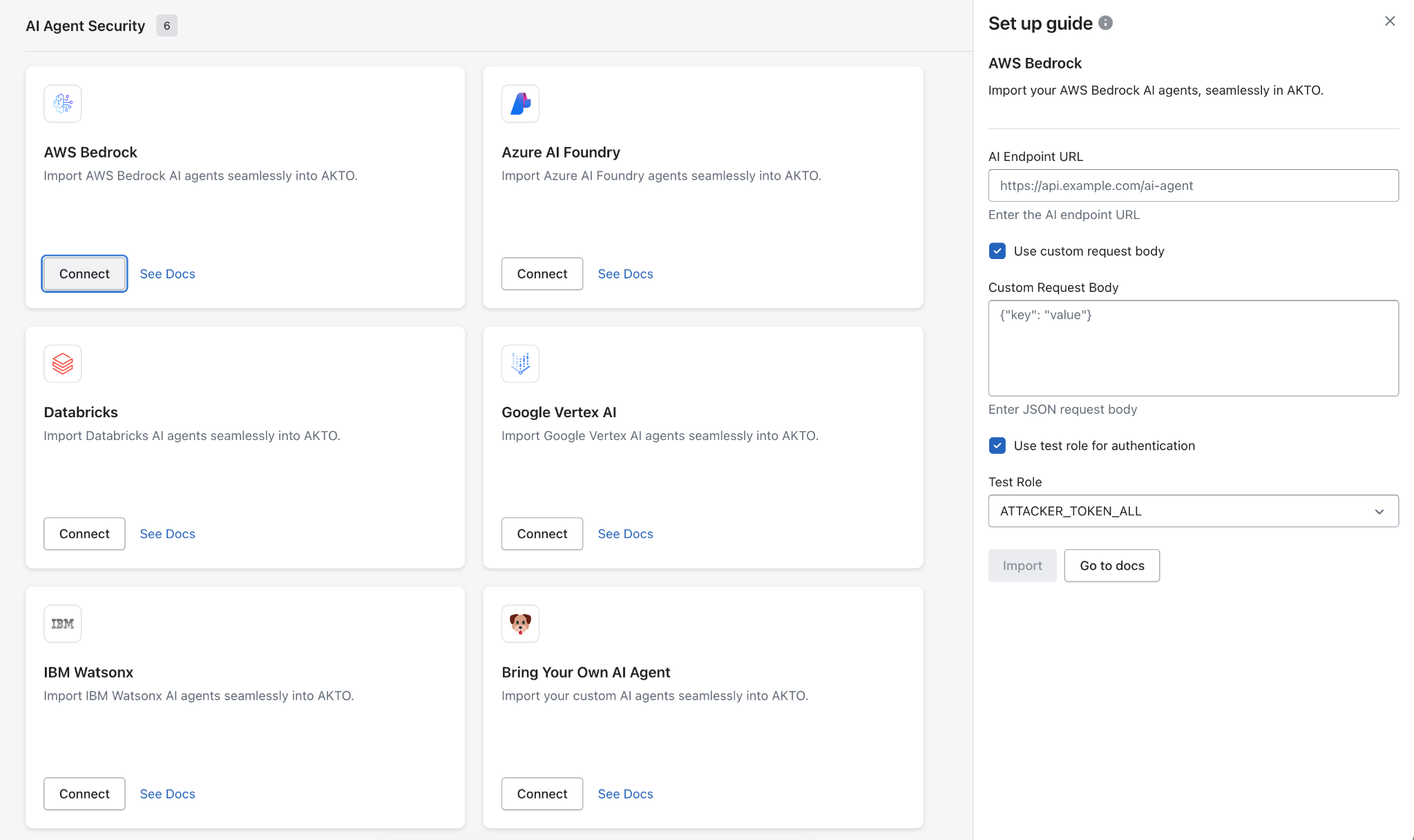
Akto lets you seamlessly import **AI agents** such as **AWS Bedrock, Azure AI Foundry, Databricks, Google Vertex AI, IBM Watsonx**, or even your **custom agent** into **AI Agent Security**. With just the agent endpoint URL and optional configuration, you can start monitoring and scanning agent activity instantly.
***
### 🔧 What You Need
* **AI Endpoint URL** (e.g., `https://api.example.com/ai-agent`)
* **(Optional) Custom Request Body** – for agents requiring specific input JSON
* **(Optional) Scan Role for Authentication** – for agents with role-based access
***
### ✅ Steps to Import
1. **Open Akto Dashboard** → Go to *Quick Start*
2. **Select your AI Agent provider** (Bedrock, Azure AI Foundry, Databricks, Vertex AI, Watsonx, or *Bring Your Own Agent*)
3. **Click “Connect”**
4. **Fill in agent details**:
* **AI Endpoint URL**: e.g., `https://api.example.com/ai-agent`
* *(Optional)* Check **Use custom request body** and enter JSON payload:
```json
{ "key": "value" }
```
* *(Optional)* Enable **Use scan role for authentication** and select a role (e.g., `ATTACKER_TOKEN_ALL`)
5. **Click Import**
Akto will automatically:
* Connect to the AI agent endpoint
* Send sample probe requests to validate the configuration
* Register the agent into **AI Agent Security Inventory** for monitoring and probing
***
### 📂 Supported AI Agents
* **AWS Bedrock** – Import Bedrock agents seamlessly
* **Azure AI Foundry** – Import Azure AI Foundry agents seamlessly
* **Databricks** – Import Databricks agents seamlessly
* **Google Vertex AI** – Import Vertex AI agents seamlessly
* **IBM Watsonx** – Import Watsonx agents seamlessly
* **Bring Your Own AI Agent** – Import any custom AI agent seamlessly
***
### 🔒 Security
* Auth/scan roles (if any) are used **only during import** and are **not stored**
* Akto uses **read-only access** to interact with your AI agent
***
### Get Support for your Akto setup
There are multiple ways to request support from Akto. We are 24X7 available on the following:
1. In-app `intercom` support. Message us with your query on intercom in Akto dashboard and someone will reply.
2. Join our [discord channel](https://www.akto.io/community) for community support.
3. Contact `help@akto.io` for email support.
4. Contact us [here](https://www.akto.io/contact-us).
%20(1).png?alt=media)