> For the complete documentation index, see [llms.txt](https://ai-security-docs.akto.io/llms.txt). Markdown versions of documentation pages are available by appending `.md` to page URLs; this page is available as [Markdown](https://ai-security-docs.akto.io/akto-argus-agentic-ai-security-for-homegrown-ai/agentic-ai-discovery.md).
# Agentic AI Discovery
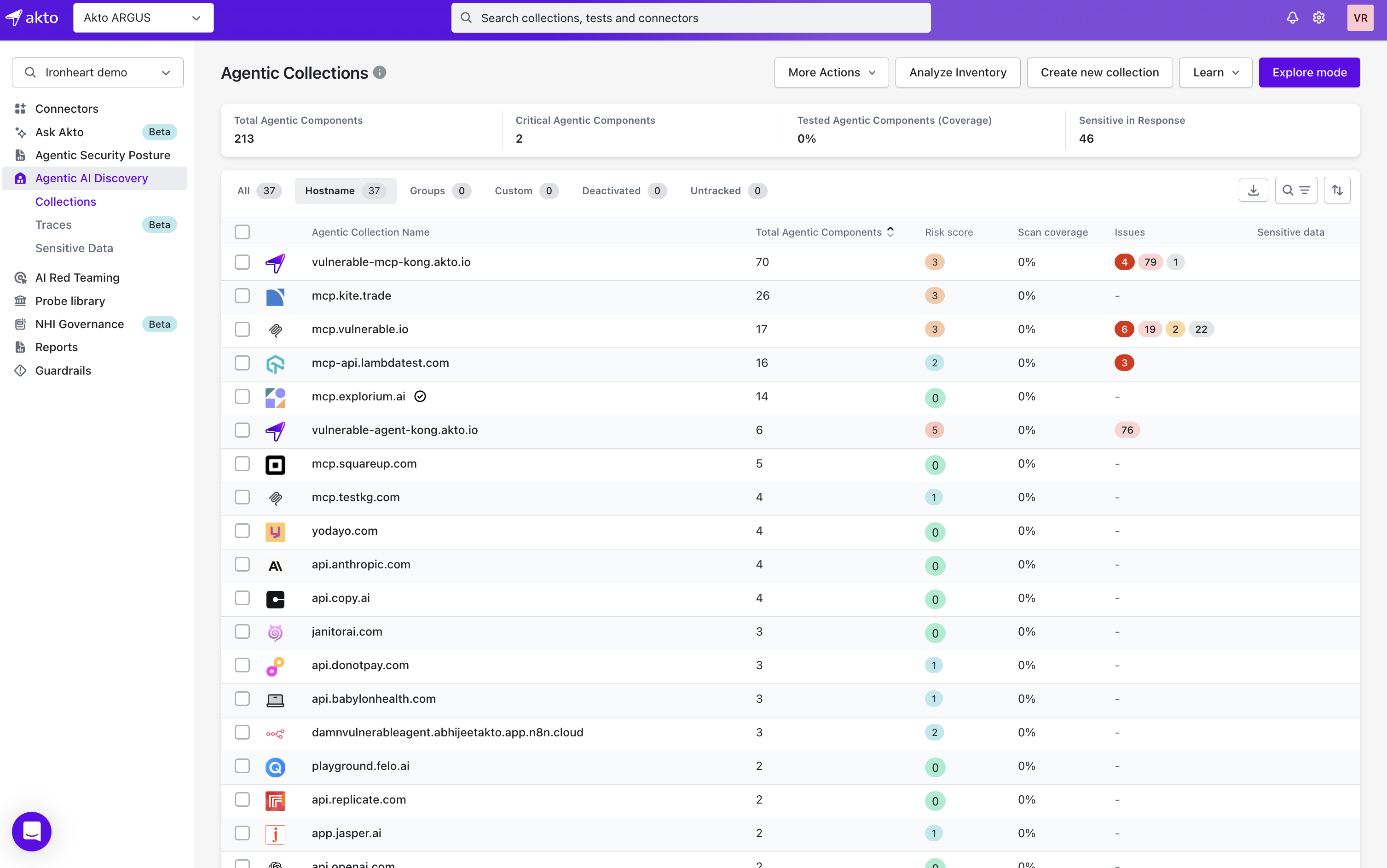
Agentic AI Discovery is your inventory of every AI agent and MCP server running across your cloud infrastructure. Once a [connector](/akto-argus-agentic-ai-security-for-homegrown-ai/connectors.md) is running, Akto continuously maps your agentic landscape: agents, MCP servers, the tools and data they touch, and how they connect to each other, so you always know what's actually deployed.
## What You Can Do
* Browse every discovered AI agent and MCP server as an organized [Collection](/akto-argus-agentic-ai-security-for-homegrown-ai/agentic-ai-discovery/concepts/collections.md), and drill into individual [Agent Components and MCP Endpoints](/akto-argus-agentic-ai-security-for-homegrown-ai/agentic-ai-discovery/concepts/endpoints.md).
* See each component's [risk score](/akto-argus-agentic-ai-security-for-homegrown-ai/agentic-ai-discovery/concepts/risk-score.md), [sensitive data](/akto-argus-agentic-ai-security-for-homegrown-ai/agentic-ai-discovery/concepts/sensitive-data.md) exposure, [auth type](/akto-argus-agentic-ai-security-for-homegrown-ai/agentic-ai-discovery/concepts/auth-types.md), and [access type](/akto-argus-agentic-ai-security-for-homegrown-ai/agentic-ai-discovery/concepts/access-type.md) at a glance.
* Catch what shouldn't still be running: [Shadow Agents](/akto-argus-agentic-ai-security-for-homegrown-ai/agentic-ai-discovery/concepts/shadow-agents.md) nobody documented, [Zombie Agents](/akto-argus-agentic-ai-security-for-homegrown-ai/agentic-ai-discovery/concepts/zombie-agents.md) nobody decommissioned, and [Third-Party Agents](/akto-argus-agentic-ai-security-for-homegrown-ai/agentic-ai-discovery/concepts/third-party-agents.md) you depend on but don't control.
* Visualise how components connect with the [AI Agent Context Graph](/akto-argus-agentic-ai-security-for-homegrown-ai/agentic-ai-discovery/concepts/api-dependency-graph.md) and [Context Graph & Trace Analysis](/akto-argus-agentic-ai-security-for-homegrown-ai/agentic-ai-discovery/concepts/agent-architecture-and-trace-analysis.md).
* Organise your inventory with [Component Groups](/akto-argus-agentic-ai-security-for-homegrown-ai/agentic-ai-discovery/concepts/component-group.md), [Tags](/akto-argus-agentic-ai-security-for-homegrown-ai/agentic-ai-discovery/concepts/tags.md), and [Environment Type](/akto-argus-agentic-ai-security-for-homegrown-ai/agentic-ai-discovery/concepts/environment-type.md).
* Get notified the moment something changes, through [Recent Changes](/akto-argus-agentic-ai-security-for-homegrown-ai/agentic-ai-discovery/concepts/recent-changes.md) and webhook [Alerts](/akto-argus-agentic-ai-security-for-homegrown-ai/agentic-ai-discovery/concepts/alerts.md).
* Build collections directly from live traffic using [Explore Mode](/akto-argus-agentic-ai-security-for-homegrown-ai/agentic-ai-discovery/concepts/explore-mode.md) and narrow any view with [Advanced Filters](/akto-argus-agentic-ai-security-for-homegrown-ai/agentic-ai-discovery/concepts/advanced-filter-option.md).
## Getting Started
1. Connect a [homegrown discovery agent](/akto-argus-agentic-ai-security-for-homegrown-ai/connectors.md) for your infrastructure, API gateways, eBPF, Kubernetes, manual import, or MCP Recon.
2. Open **Agentic Discovery** in your dashboard to see every discovered agent, MCP server, and tool.
3. Select any component to inspect its endpoints, risk score, and meta properties.
## Next Steps
* Run [Red Teaming](/akto-argus-agentic-ai-security-for-homegrown-ai/agentic-red-teaming/get-started.md) on discovered components.
* Enable [Guardrails](/agentic-guardrails/overview.md) for real-time protection.
* Review Shadow, Zombie, and Third-Party agents for anything that shouldn't be reachable.
Need help? Contact or use in-app Intercom.