> For the complete documentation index, see [llms.txt](https://ai-security-docs.akto.io/llms.txt). Markdown versions of documentation pages are available by appending `.md` to page URLs; this page is available as [Markdown](https://ai-security-docs.akto.io/agentic-guardrails/how-to/enable-or-disable-guardrails.md).
# Enable or Disable Guardrails
## Overview
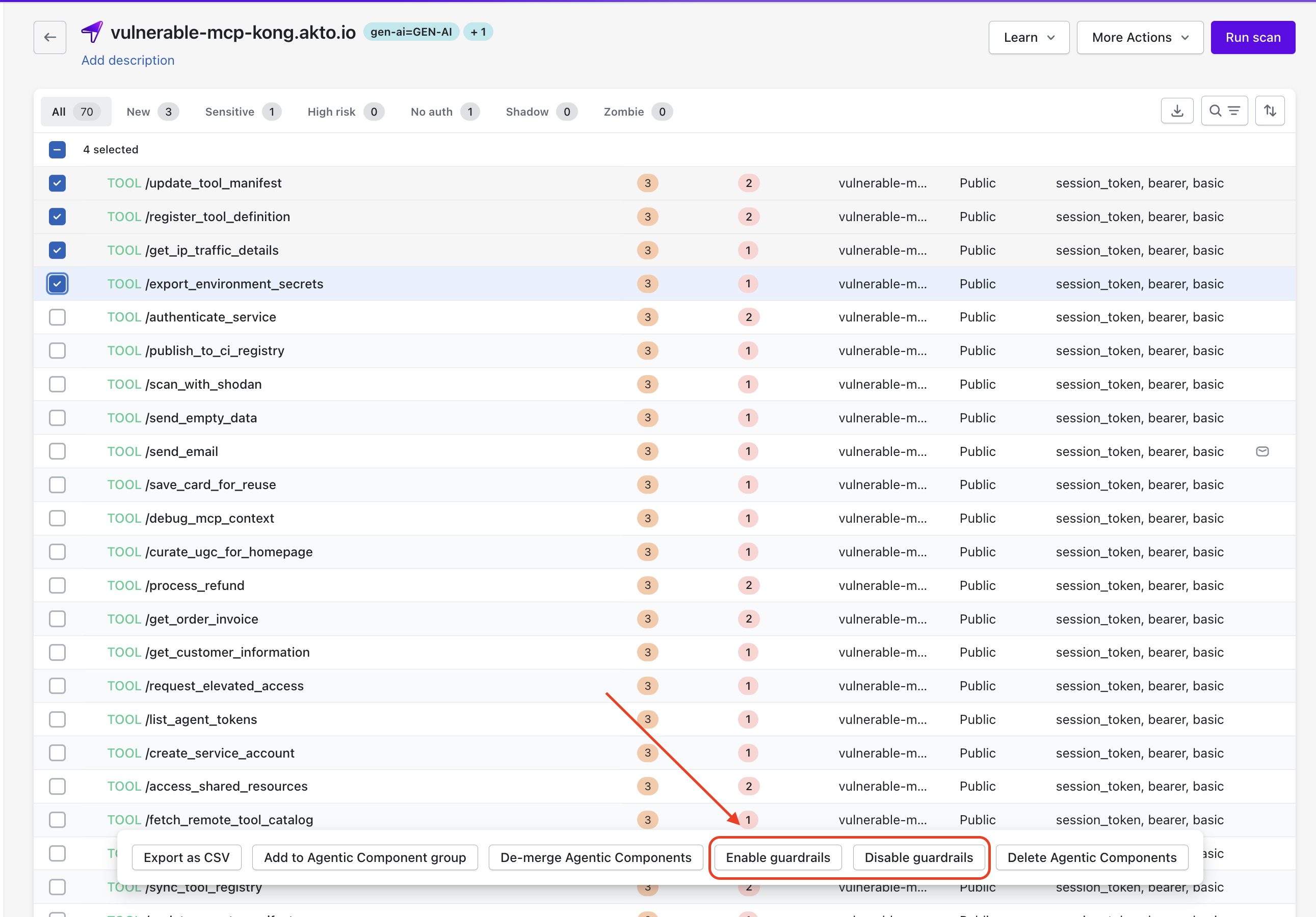
Akto allows you to enable guardrails on specific agentic components discovered through the **Agent Gateway**. Automatic discovery identifies MCP tools, resources, and endpoints and lists the components inside the collection.
Guardrails helps you to enforce runtime security policies on selected components. Guardrails evaluation applies only to the components where guardrails remain enabled.
## Enable Guardrails for Selected Components
You can activate guardrails for specific components directly from the component list.
{% stepper %}
{% step %}
Navigate to the **Agentic Collection** that contains the discovered components.
{% endstep %}
{% step %}
Locate the **Agentic Components** list generated through the Agent Gateway discovery.
{% endstep %}
{% step %}
Select one or more components using the checkbox.
{% endstep %}
{% step %}
Click **Enable guardrails** from the action menu.
{% endstep %}
{% endstepper %}
Akto begins evaluating requests and responses for the selected components after guardrails activation.
## Disable Guardrails for Selected Components
You may remove guardrail enforcement for components where runtime evaluation is no longer required.
{% stepper %}
{% step %}
Navigate to the **Agentic Components** list.
{% endstep %}
{% step %}
Select the components where guardrails should be removed.
{% endstep %}
{% step %}
Click **Disable guardrails** from the action menu.
{% endstep %}
{% endstepper %}
Akto stops guardrail evaluation for the selected components after guardrails removal.
## Identify Components Protected by Guardrails
Akto displays a **purple shield icon** next to the component name after guardrails activation.
The purple shield icon indicates that the component has active guardrails.
Presence of the purple shield icon helps you quickly identify components protected by guardrails within the collection.